
The way tasks and processes are managed in Jira is through workflows. A workflow maps out the statuses an issue can go through and the available transitions between the statuses that together define your entire process.
You can edit the overall workflow used in a project, or modify the way particular issue types are handled in the workflow. But: At some point, you might end up stuck in the middle of nowhere because of feature limitations.
At this point, Jira Workflow Toolbox for Jira comes in handy!
JWT for Jira enhances the way you configure workflows. It extends the native functionality by offering custom conditions, validators, and post functions.
Expression parser
Expressions are a fundamental concept within Jira Workflow Toolbox: every input into the JWT expression editor is considered an expression and will be interpreted by the JWT expression parser against the selected Parsing modes .
If you are new to JWT, we suggest starting with the JWT expression editor.
Conditions
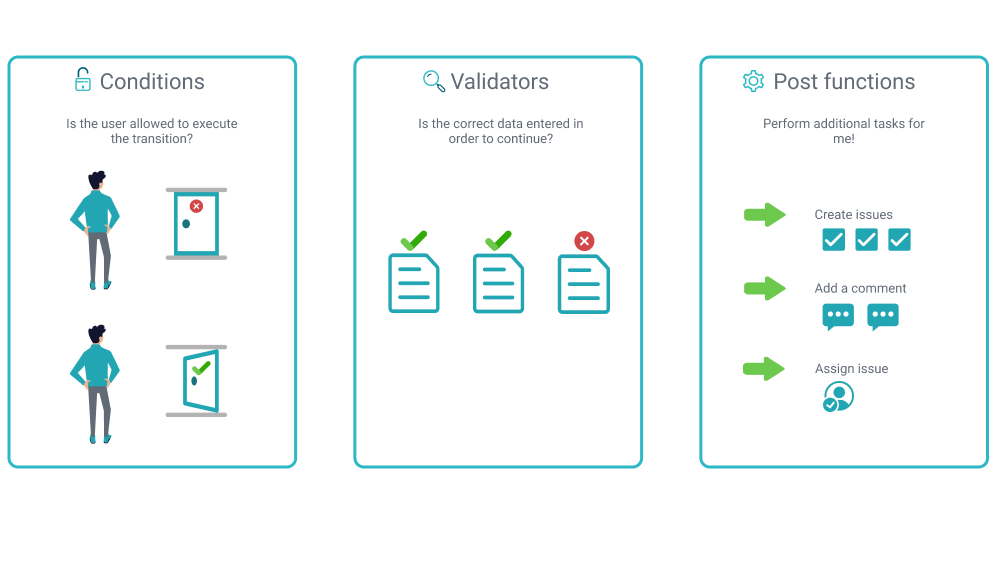
Conditions are used to control the transitions available to a user. If a condition fails, the user will not see the transition button on the Jira issue view, and so will not be able to execute the transition.
• Condition types
-
Compare two values condition -
Condition based on cascading select list value -
Condition based on JQL query -
Condition based on regular expression -
Condition on JWT project property -
Condition on linked issues -
Condition on sub-tasks -
Except assignee -
Except reporter -
Except users in a field -
Fields required -
Hide transition from user (bulk operation only) -
Hide transition from user (JWT function only) -
Logical condition -
Only users in a field -
User is not in project role -
Users are/aren't in project role (condition)
📚 Condition use cases library
| Use case | JWT feature | Label | Parser functions | Use case description | Workflow function |
|---|---|---|---|---|---|
| Specific sub-tasks must be resolved |
(blue-star) (blue-star) |
|
Ensure that that all sub-tasks of a specific issue type are resolved. |
||
| Prevent users from selecting specific fix versions |
(blue-star) (blue-star) |
|
Ensure that specific fix versions have not been selected. |
||
| All sub-tasks must be resolved |
(blue-star) (blue-star) |
staff pick |
Ensure that that all sub-tasks of the current issue are resolved. |
||
| Make the assignee required |
(blue-star) (blue-star) |
|
|
||
| An issue must have at least 3 resolved Test Cases |
(blue-star) (blue-star) |
|
Ensure that that all sub-tasks of a specific issue type are resolved. |
||
| Only watchers can execute a transition |
(blue-star) |
|
Ensure that only users watching an issue can see a transition. |
||
| A developer must not execute the transition |
(blue-star) |
|
|
||
| Only users in a project role can execute a transition |
(blue-star) (blue-star) |
|
|
||
| All blocking issues must be resolved |
(blue-star) (blue-star) |
|
|
||
| There must be at least one related Service Management request |
(blue-star) (blue-star) |
|
|
||
| All sub-tasks with a resolution of Done must be in a specific status |
(blue-star) (blue-star) |
|
Ensure that all sub-tasks, which have a resolution value of Done must be in the Closed status. |
||
| Assignee may only have a restricted number of assigned issues |
(blue-star) (blue-star) |
|
|
||
| Only user specified in project property is allowed to execute transition |
(blue-star) (blue-star) |
|
|||
| All sub-tasks must be Done or Closed |
(blue-star) (blue-star) |
|
Ensure that that all sub-tasks of the current issue are Done or Closed. |
||
| Hide transition to a previous status |
(blue-star) |
|
Hide a transition based on the condition of the previous status. |
||
| Hide transition from issue creator |
(blue-star) |
|
Hide a transition from the issue creator. |
||
| Make the description required |
(blue-star) (blue-star) |
|
|
||
| Current user must be reporter |
(blue-star) (blue-star) |
|
|
||
| Set a condition in a global transition which only applies in a certain status |
(blue-star) |
|
Set a transition that only applies in a certain status. |
||
| Resolution must be empty |
(blue-star) (blue-star) |
|
|
||
| All sub-tasks in the Closed status must have a specific resolution |
(blue-star) (blue-star) |
|
|
Ensure that all sub-tasks, which are in the Closed status have a resolution of Done. |
Validators
Validators are used to guarantee accuracy of existing issue data or data entered on a transition screen before a transition is performed.
• Validator types
📚 Validator use cases library
| Use case | JWT feature | Label | Parser function | Parser functions | Use case description | Workflow function |
|---|---|---|---|---|---|---|
| Prevent a transition depending of the number of components |
(blue-star) (blue-star) |
|
||||
| Prevent a closed issue from being reopened after resting 1 week closed |
(blue-star) (blue-star) |
|
Prevent an issue from being reopened after being closed for a period of time unless the user has some specific roles. |
|||
| Prevent issue from being "Closed" if blocking issues are not closed yet. |
(blue-star) |
|
|
Prevent issues from being closed if there exist blocking issues (linked with "is blocked by") still not closed. |
||
| Prevent the creation of sub-tasks unless the parent issue is in a certain status |
(blue-star) |
|||||
| Block an Epic's transition until all the issues under that Epic are resolved |
(blue-star) |
|
||||
| Block an Epic's transition depending on linked issues status and due date |
(blue-star) (blue-star) |
|
Allow a certain transition in Epic's workflow to be executed. |
|||
| Prevent transitioning when there is a blocking issue |
(blue-star) |
|
|
Block the transition of an issue from "In progress" to "Completed" until all linked issues that block this issue are resolved. |
||
| Evaluate Assets objects |
(blue-star) (blue-star) |
|
Evaluate if an object is in a Assets object custom field. |
|||
| Prevent issue creation with the same field value |
(blue-star) |
Staff pick |
|
Prevent issue creation when there is already another issue in the same project with the same value in a certain field. |
||
| Proceed with a task only when all sub-tasks are completed |
(blue-star) (blue-star) |
|
|
Only proceed with a task only when all sub-tasks are completed. |
||
| Prevent setting due dates outside business hours |
(blue-star) |
staff pick |
||||
| Prevent creation of issues with a duplicate summary |
(blue-star) |
|
Ensure that users cannot create new issues if an issue of the same type and summary already exists in the project. |
|||
| Ensure that all issues linked with a certain issue link type have "Due Date" field set |
(blue-star) (blue-star) |
|
Check that the issue linked to the current issue with link type name "linkA" has a due date field set. |
|||
| Validation based on the value of a date type project property |
(blue-star) |
|
Show project property value in the validation message |
|||
| Prevent issue creation if description contains less than 100 characters |
(blue-star) |
|||||
| Restrict issue creation per issue type and project role |
(blue-star) |
|
||||
| Validate a Select List (cascading) custom field |
(blue-star) |
|
|
Validate the parent and child options of a Select List (cascading) field. |
||
| Ensure that an issue has at least one attachment |
(blue-star) |
Staff pick |
Validate that an issue has specific files attached. |
|||
| Prevent issue creation with the same field value (Boolean) |
(blue-star) |
|
Prevent issue creation when there is already another issue in the same project with the same value in a certain field. |
|||
| Validate only issue links created in transition screen |
(blue-star) |
|
Check only the issue links added to the transition screen. |
|||
| Reject duplicated file names in attachments |
(blue-star) (blue-star) |
|
Reject attachments with repeated file names. |
|||
| Prevent external users from creating issues |
(blue-star) |
matches() toString() textOnStringList() toStringList() userDisplayName() |
||||
| Halt a transition if an element is not contained in a list |
(blue-star) (blue-star) |
|||||
| Block a transition until all sub-tasks have certain fields populated |
(blue-star) (blue-star) |
staff pick |
Allow a transition only if all sub-tasks have specific fields populated |
|||
| Restrict the issue creation with specific issue types to certain project roles |
(blue-star) |
|
|
|||
| Close parent issue only when all sub-tasks are closed |
(blue-star) (blue-star) |
|
|
Automatically close parent issue when all sub-tasks has been closed. |
||
| Make "Time spent" field required |
(blue-star) |
|
|
Post functions
Post functions are used to perform additional processing and help to automate tasks after a transition is performed.
• Post function types
-
Add comment -
Add or disable option in (multi-) select list, radio button, or checkbox field -
Add or disable option in cascading select list field -
Add or remove watchers -
Assign to project role -
Copy cascading select list value -
Copy excerpted value -
Copy field values from linked issues or subtasks -
Copy field values from multiple issues -
Copy JWT project property -
Copy JWT user property -
Create issue -
Create issue link -
Delete issue link -
Execute remote action -
Format field value -
Log work -
Move issue -
Regular expression renderer -
Send email -
Set or create JWT project property -
Set or create JWT user property -
Transition issue -
Update field based on rules -
Update linked issue or sub-task -
Update or copy field values
To get more familiar with post functions, we recommend to take a look at our use case library: