
Use case
To keep your Jira tickets clean, having a common structure throughout the issue summaries might be helpful.
In the following use case we're going to use the Format field value post function to format the summary properly.
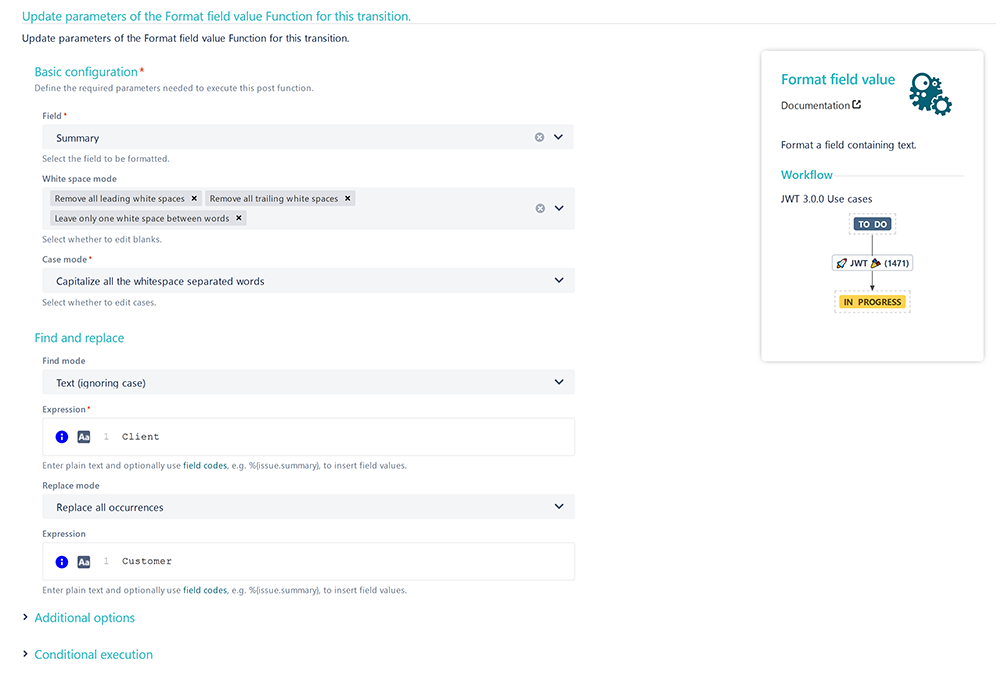
In our case, all leading and trailing white spaces will be removed and only one white space will be left between words.
In addition, the word Client will be replaced with Customer.
🛠️ Configuration
Add the Format field value post function to the desired transition or create a new transition.
You might want to add the post function to the create transition so that the post function will be automatically executed every time a new issue is created.
Field
Choose Summary
White space mode
Choose:
Remove all leading white spaces
Remove all trailing white spaces
Leave only one space between words
Case mode
Choose Capitalize all the whitespace separated words
Find and replace
Find mode
Choose Text (ignoring case)
Expression
Enter the following expression:
Client
You can also use another word than Client depending on the word you want to replace.
Replace mode
Choose Replace all occurrences
Expression
Enter the following expression:
Customer
📷 Screenshots
📚 Related use cases
| Use case | Workflow function |
|---|---|
| Format the issue's summary according to specified rules |