
This post function automatically creates one or multiple issue links.
You can create links between virtually any issue.
🛠️ Configuration
Issue link type
Select the issue link type to be created between the source issue and the destination issue. All available link types will be displayed.
Source issues
Select the source issues to create the issue links from. The following options are available:
|
Option |
Description |
|---|---|
|
Current issue |
The link will be created from the current issue. |
|
Issue keys in field |
When you select this option, specify the field containing the key(s) of the issues that should be linked from. The field must contain either a single issue key or a list of issue keys, separated by comma or blank. |
|
Set issues manually (parser expression) |
When you select this option, you can specify the issues to be linked through an expression in JQL mode. |
Destination issues
Select the destination issues to create the issue links to. The following options are available:
|
Option |
Description |
|---|---|
|
Issue keys in field |
When you select this option, specify the field containing the key(s) of the issues that should be linked to. The field must contain either a single issue key or a list of issue keys, separated by comma or blank. |
|
Set issues manually (parser expression) |
When you select this option, you can specify the issues to be linked through an expression in JQL mode. |
Additional options
You can select how the issue links should be created in case there are multiple issues to be linked. The following options are available:
|
Option |
Description |
|---|---|
|
Many-to-many relationship |
Each source issue will be linked to all destination issues. 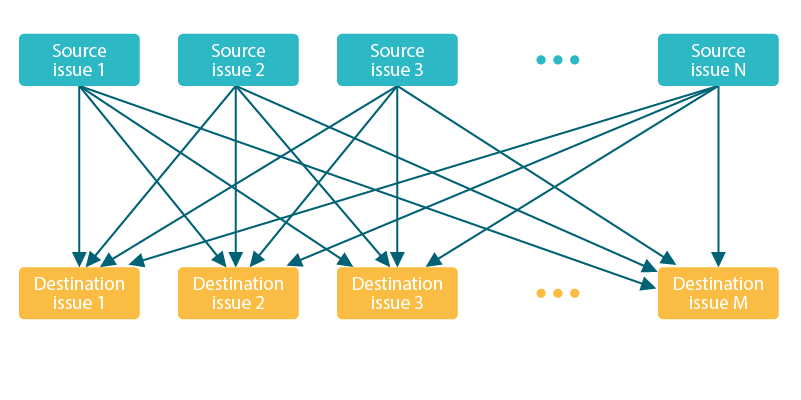
|
|
One-to-one relationship |
Each source issue will be linked to one destination issue according to order in which they are returned by the JQL query. 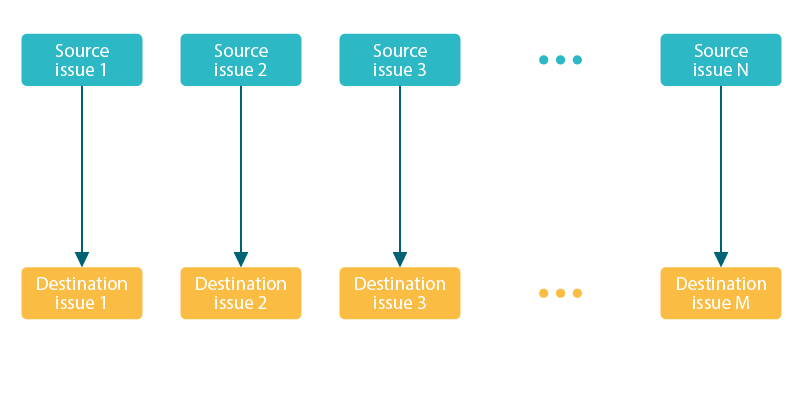
|
Conditional execution
You can optionally specify a logical expression to define the circumstances (or conditions) under which the post function should be executed.
The result of the logical expression must return a boolean value of either:
-
true→ the post function will be executed -
false→ the post function will not be executed
Using the conditional operator, even complex or multi-layered conditions can be constructed.
Make sure to learn more about defining logical expressions and browse through the various examples here: Logical mode
Run as
Select which user will be used to execute this post function. By default this parameter is set to the current user. You can also use field codes to run the function as a dynamic user (e.g. current assignee).
Make sure that the user running the post function has all the relevant permissions to perform the actions defined in the configuration (e.g. "Update Issues")!
If you want to keep track the actions being performed automatically, we suggest to create a dedicated JWT account, granted all relevant permissions, and use it in the Run as parameter to identify which changes have been made with JWT.
📚 Use cases and examples
| Use case | Workflow function | Parser functions |
|---|---|---|
| Link issue to issue keys in its description |