Use case
Often creating repetitive issues is daily work, e.g. in a software development release process. It might be that for every new feature specific tasks have to be done in order to successfully release a new software version containing this feature, while updating the product documentation, the marketplace presence or sending a newsletter to all customers.
To avoid creating these issues always manually, the following automation rule can easily manage this by creating the issues automatically.
Should I use a workflow post function or an automation rule?
When to use this workflow post function and when to use an automation rule?
This use case is very useful if only want to create issues automatically for one project and workflow.
If repetitive issues have to be created in several projects, however, that have different workflows, configuring just one automation rule with the Create issue action might then be the easier way to go.
In this case, you might want to check out our corresponding automation use case.
🛠️ Configuration
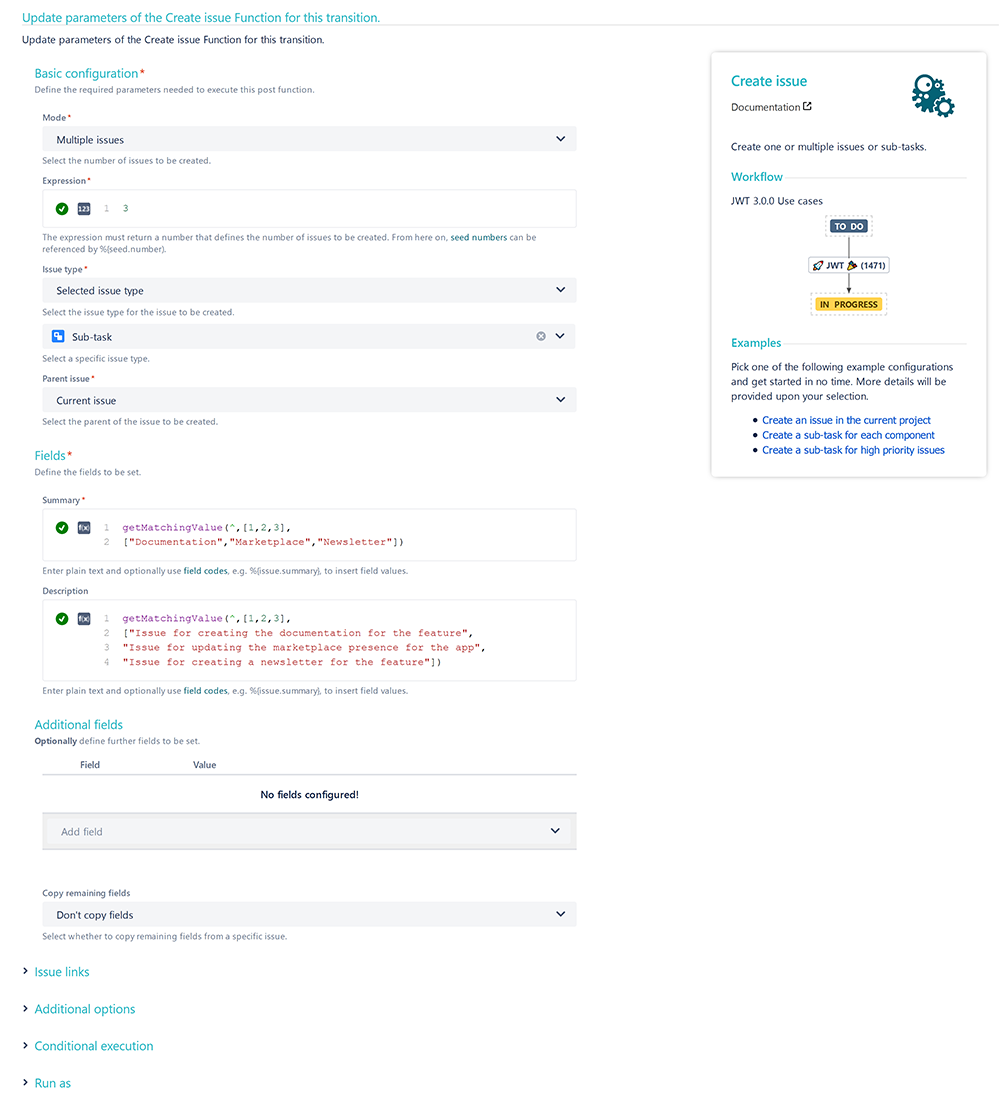
Add a Create issue post function to the workflow transition you want. The Create issue transition might be the best choice here.
Issues to be created
Mode
Choose Multiple issues
Expression
3
with parsing mode set to Numeric
Issue type
Choose Selected issue type → Sub-task
Parent issue
Choose Current issue
Summary
Enter the following Parser Expression :
getMatchingValue({seed.number},[1,2,3],
["Documentation","Marketplace","Newsletter"])
with parsing mode set to Advanced text.
Description
Enter the following Parser Expression :
getMatchingValue({seed.number},[1,2,3],
["Issue for creating the documentation for the feature",
"Issue for updating the marketplace presence for the app",
"Issue for creating a newsletter for the feature"])
with parsing mode set to Advanced text.
Run as
User
Choose Current user
📷 Screenshots