Use case
Commenting on a Jira ticket is a great way to share important information. In some cases also things like email addresses get shared via a comment. To not lose those information but extract them, the following use case can be used.
We are going to extract an email address from the last comment and save it to a custom field.
Prerequisites
First we need to create a custom field where the extracted email address can be stored.
Set up the custom field
If you don't have a multi line custom field to store the email address, you might want to create one.
-
Head over to Custom Fields in the Jira Administration → Issues.
-
Create a new custom field of type Text field (multi line).
🛠️ Configuration
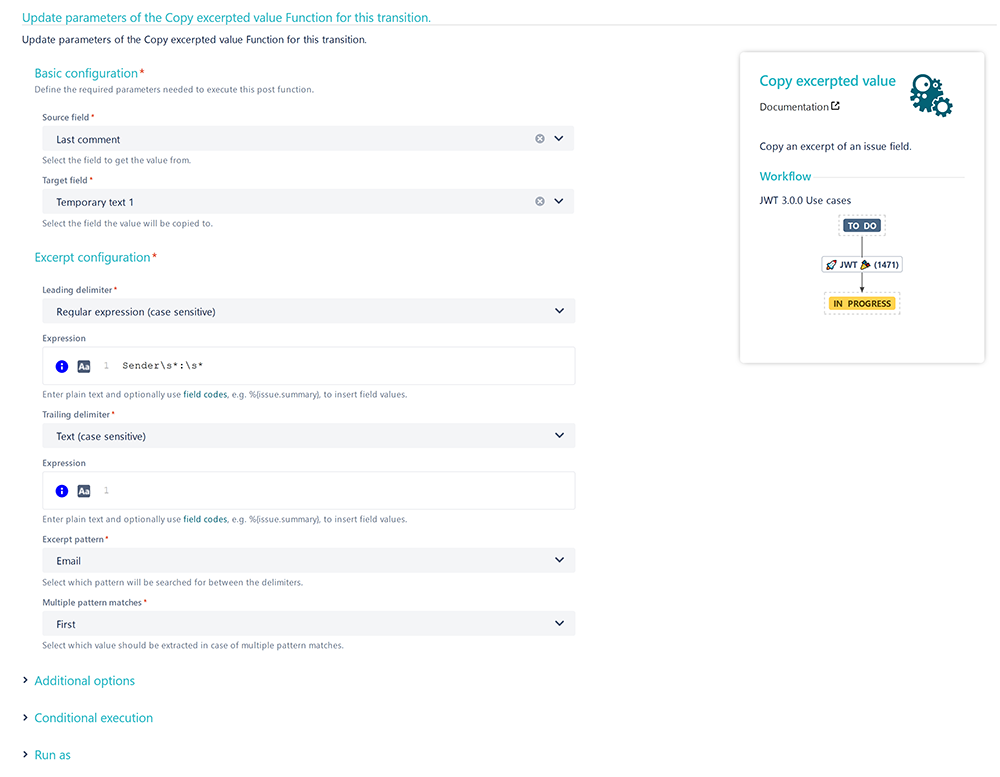
Add the Copy excerpted value post function to the desired workflow transition.
Source field
Choose Last comment
Target field
Choose the previously created multi line text field
Excerpt configuration
Leading delimiter
Choose Regular expression (case sensitive)
Expression
Enter the following Expression:
Sender\s*:\s*
Trailing delimiter
Choose Text (case sensitive)
Expression
Leave this one empty
Excerpt pattern
Choose Email
Multiple pattern matchers
Choose First
The comment to be added should look something like this:
Hi,
some text.
Sender: <Email address to be extracted>
More text.
📷 Screenshots