
Use case
In Jira you can easily use custom fields - e.g. select lists - to specify further information regarding any issues.
In this use case we are going to set a watcher based on the selected value in a custom select list.
Prerequisites
Set up the custom field
If you don't have a custom select list field yet, you might want to create one.
-
Head over to Custom fields in the Jira Administration → Issues.
-
Create a new custom field of type Select list (single choice).
-
Add some options to the custom field, e.g.:
-
Sales
-
Marketing
-
Development
-
HR
-
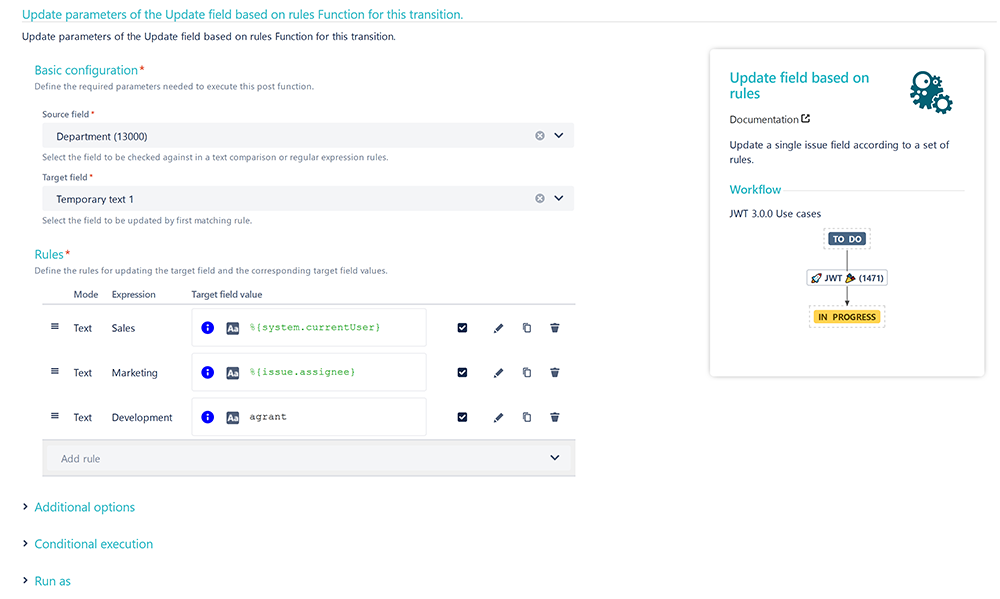
If the custom field is set up, we also have to add the Update field based on rules post function.
Add the Update field based on rules post function to a workflow transition that fits best for you.
The Create transition might be a perfect spot, so that the watchers get added right after creating the issue.
Source field
Choose the previously created select list field.
Target field
Choose Temporary text 1
Rules
Click on Add Rule
Choose Text comparison
Keyword
Enter
<option>
Replace <option> with the actual option name from the select list.
Value
Enter
<username>
Replace <username> with the actual username you want to add as watcher, if the above entered option is selected.
Repeat the steps above for each option in the select list.
The final configuration could then look something like this:
🛠️ Configuration
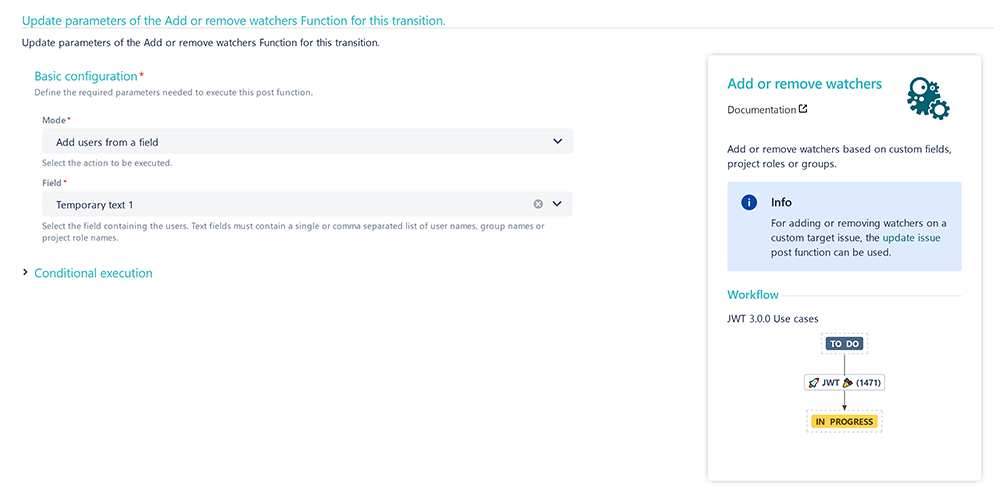
Add the Add or remove watchers post function right underneath the post function we've previously created.
Mode
Choose Add users from a field
Field
Choose Temporary text 1
📷 Screenshots
📚 Related use cases
| Use case | Workflow function |
|---|---|
| Add watchers based on issue type | |
| Set a watcher based on custom field value |