
Use case
In this example, the Log work post function will be used to log work on another ticket.
In this case there is a Jira ticket for each employee. In addition, "Absence" tickets can be created for a specific day. If this ticket gets approved, 8 hours will be logged on the related employee ticket.
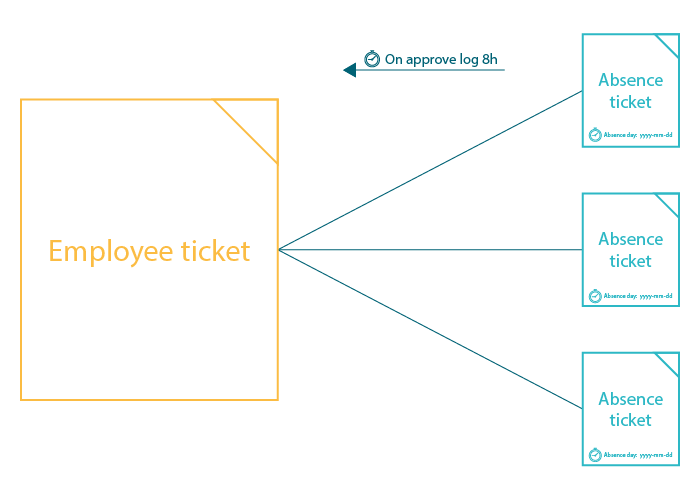
The employee ticket must have the summary "Employee <username>".
Prerequisites
First, we have to create a date custom field to enter the absence day.
Set up the custom field
Create a Date Picker custom field
Name: Absence day
Add the created custom field to the screen(s) of the absence ticket.
🛠️ Configuration
Add the Log work post function to the desired transition or create a new transition.
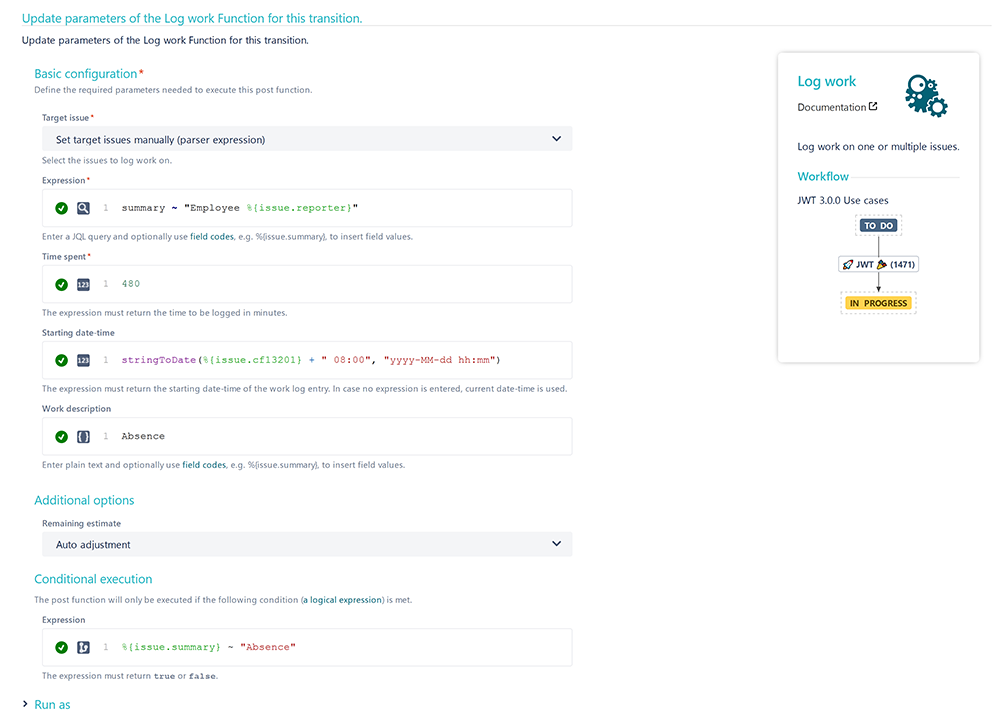
Target issue
Choose Set target issue manually
Expression
Enter the following expression with mode set to JQL :
summary ~ "Employee %{issue.reporter}"
Time spent
Enter the following number:
480
Since the time spent must be entered in minutes and 8h correspond to 480 minutes, this number has to be entered.
Starting date-time
Enter the following expression:
stringToDate(%{issue.cfnnnnn} + " 08:00", "yyyy-MM-dd hh:mm")
cfnnnnn is the field code for the Absence day custom field we've previously created.
Update the field code to the corresponding field code on your instance!
Work description
Enter a description like the following:
Absence
Feel free to change the description according to your needs!
Additional options
Remaining estimate
Choose Auto adjustment
Conditional execution
Finally, we add a conditional execution so that the post function will only be executed if the issue's summary is " Absence ".
%{issue.summary} ~ "Absence"
📷 Screenshots
📚 Related use cases
| Use case | Workflow function | Parser functions |
|---|---|---|
| Log absence time on another issue | ||
| Add percentaged profit margin when closing issue | ||
| Automatically log work spent in a specific status |