
The Advanced Formula Fields template gallery offers a wide range of ready‑made templates that you can use with very little setup. You can access the template gallery in the side bar and you’ll see these templates when you Create and configure formula fieldsor when you Manage existing formula fields / Field overview.
The templates are grouped into logical categories based on typical use cases and the type of data you might want to display.
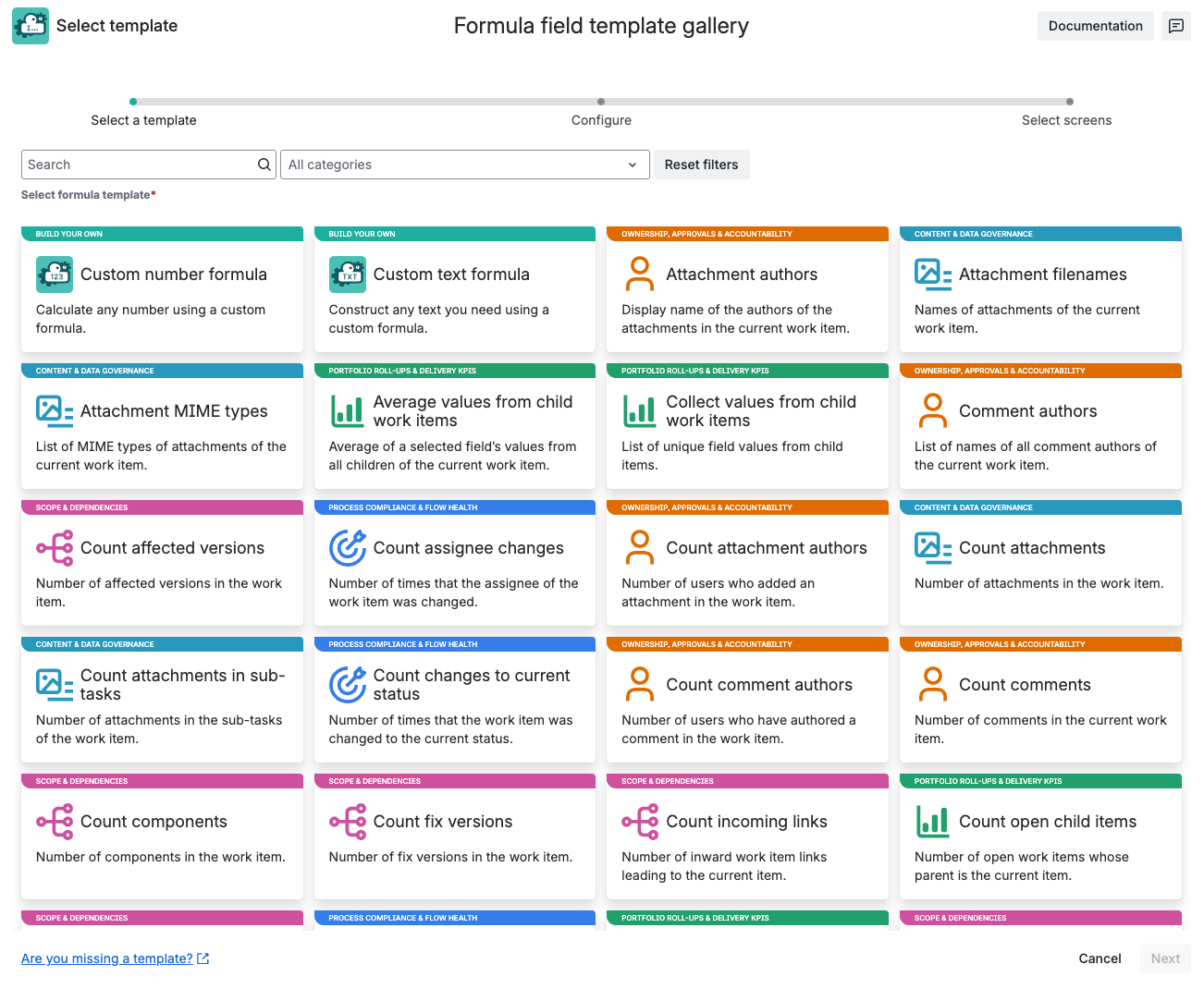

Governance & business KPIs
Use these templates when you need KPIs that go beyond pure delivery metrics. Combine existing fields, formula fields, and business logic into numeric or text indicators that represent risk, value, compliance, or business performance. These KPIs can be reused in workflows, approvals, dashboards, and reports across Jira and JSM.
| Template | Field type | Description |
|---|---|---|
| ICE score |
Advanced number formula |
Multiplication of the Impact, Confidence and Ease parameters of the current work item. |
| WSJF (Weighted Shortest Job First) |
Advanced number formula |
Rank epics and initiatives by WSJF: (Value + Time + Risk) / Size. |
| Time spent ratio |
Advanced number formula |
Percentage of the original estimate already logged as time spent. |
| RICE score |
Advanced number formula |
Prioritize work by RICE: (Reach × Impact × Confidence) ÷ Effort. |

Portfolio roll‑ups & delivery KPIs
Summarize how much work exists, how much is done, and how much effort is left - across epics, parents, and linked items. Build portfolio dashboards and governance KPIs without spreadsheets.
| Template | Field type | Description |
|---|---|---|
| Time spent in the current and linked work items |
Advanced number formula |
Sum of the time spent in the current and linked work items. |
| Collect values from child work items |
Advanced text formula |
This template creates a list of unique field values from child items. |
| Sum original estimates of all descendants |
Advanced number formula |
Return the sum of the original estimates of the work items under the epic's parent in hours only in the epic's parent view. |
| Sum completed child items' story points |
Advanced number formula |
Sum of story points from completed items whose parent is the current work item. |
| Percentage of resolved child work items |
Advanced number formula |
Percentage of child work items with a resolution. |
| Average values from child work items |
Advanced number formula |
This template calculated the average of a selected field’s values from all direct children of the current work item. Work items with an empty field are excluded from the calculation. |
| Ratio of a field to another as a percentage |
Advanced number formula |
Ratio of a field to another as a percentage |
| Parent priority |
Advanced text formula |
Priority of the parent of the current work item. |
| Time spent in linked work items |
Advanced number formula |
Sum of the time spent in the work items linked to the current work item. |
| Time spent in epic and its children |
Advanced number formula |
Sum of the time spent in the current epic and its child work items. |
| Count open child items |
Advanced number formula |
Number of open work items whose parent is the current work item. |
| Sum remaining estimate in epic |
Advanced number formula |
Sum of the remaining estimate of the work items in the current epic. |
| Count sub-tasks |
Advanced number formula |
Number of sub-tasks of the current work item. |
| Sum remaining estimate in epic, incl. sub-tasks |
Advanced number formula |
Sum of the remaining estimate of the work items and their sub-tasks in the current epic. |
| Sum Story points in linked Epic |
Advanced number formula |
Sum of story points from work items in the same epic as the current item. |
| Parent status |
Advanced text formula |
Status of the parent of the current work item. |
| Sum values from child work items |
Advanced number formula |
This template calculates the sum of a selected field's values from all direct children of the current work item. |

Process compliance & flow health
Use these templates when you want Jira to tell you whether your workflows are actually followed. Track status changes, reassignments, loops, and time spent in stages to spot broken approvals, bottlenecks, and non-compliant behavior.
| Template | Field type | Description |
|---|---|---|
| Days in previous status |
Advanced number formula |
Number of days that the current item spent in the previous status. |
| Count work item rejections |
Advanced number formula |
Number of times that the current work item was rejected. |
| Last status change author |
Advanced text formula |
Name of the last user who changed the status of the current work item |
| Previous status |
Advanced text formula |
Name of the previous status that the work item was in. |
| Timely resolution assessment |
Advanced text formula |
Assessment of whether the resolution was set before the due date. |
| Time in previous status |
Advanced number formula |
Time that the current item spent in the previous status. |
| Count assignee changes |
Advanced number formula |
Number of times that the assignee of the current work item was changed. |
| Count changes to current status |
Advanced number formula |
Number of times that the current work item was changed to the current status. |
| Count status changes |
Advanced number formula |
Number of times that the status was changed in the current work item. |

Scope & dependencies
These templates help you understand how risky a change is before you make it. Count links, blockers, versions, components, and total scope under epics to assess impact and dependency risk.
| Template | Field type | Description |
|---|---|---|
| Count affected versions |
Advanced number formula |
Number of affected versions in the current work item. |
| Count fix versions |
Advanced number formula |
Number of fix versions in the current work item. |
| Count work items and sub-tasks in epic |
Advanced number formula |
Number of work items and their sub-tasks in the current epic. |
| Count work item links |
Advanced number formula |
Number of work item links in the current work item. |
| Count incoming links |
Advanced number formula |
Number of inward work item links leading to the current work item. |
| Count unresolved blocking work items |
Advanced number formula |
Number of unresolved work items linked to the work item with “is blocked by”. |
| Count outgoing links |
Advanced number formula |
Number of outward links stemming from the current work item. |
| Count components |
Advanced number formula |
Number of components in the current work item. |
| Count work items in epic |
Advanced number formula |
Number of child work items in the current epic excluding sub-tasks. |

Ownership, approvals & accountability
These templates build an accountability trail: who previously owned an item, who changed its status, who commented or attached files, and who owns parents and projects. Use them in list views, approval flows, or audit reports.
| Template | Field type | Description |
|---|---|---|
| Parent assignee |
Advanced text formula |
Name of the assignee in the parent of the current work item. |
| Last comment |
Advanced text formula |
Text of the last comment in the current work item. |
| Previous assignee |
Advanced text formula |
Name of the previous assignee in the current work item. |
| Last assignee change author |
Advanced text formula |
Name of the last user who changed the Assignee field. |
| Parent reporter |
Advanced text formula |
Name of the reporter in the parent of the current work item. |
| Attachment authors |
Advanced text formula |
Display name of the authors of the attachments in the current work item. |
| Last comment author |
Advanced text formula |
Name of the author of the last comment of the current work item. |
| Count comments |
Advanced text formula |
Number of comments in the current work item. |
| Count comment authors |
Advanced text formula |
Number of users who have authored a comment in the work item. |
| Comment authors |
Advanced text formula |
List of names of all comment authors of the current work item. |
| Count attachment authors |
Advance number formula |
Number of users who added an attachment in the work item. |
| First comment author |
Advanced text formula |
Name of the author of the first comment of current work item. |

SLA, aging & compliance timelines
These templates measure how long work spends in certain states and whether deadlines are met. Use them for SLA dashboards, aging queues, escalation rules, and compliance checks.
| Template | Field type | Description |
|---|---|---|
| Time elapsed |
Advanced number formula |
Time elapsed from the date in a selected field until today. |
| Creation date of parent epic |
Advanced text formula |
Creation date of the parent epic of the current work item. |
| Days between dates |
Advanced number formula |
Days elapsed between two chosen date fields. |
| Time interval |
Advanced number formula |
Days elapsed between two chosen date fields. |
| Time until date and time |
Advanced number formula |
Time until a date in a selected field is reached from today. |
| Days elapsed |
Advanced number formula |
Days elapsed from the date in a selected field until today. |
| Months elapsed |
Advanced number formula |
Months elapsed from the date in a selected field until today. |
| Days until date |
Advanced number formula |
Days from today until the date in a selected field. |
| Time in statuses |
Advanced number formula |
Time elapsed from the date in a selected field until today. |

Content & data governance
Use these templates to understand what kind of content is stored in Jira work items: attachment sizes, file types, filenames, labels, etc. They support information governance, security reviews, and data hygiene.
| Template | Field type | Description |
|---|---|---|
| Count attachments in sub-tasks |
Advanced number formula |
Number of attachments in the sub-tasks of the current work item. |
| Count attachments |
Advanced number formula |
Number of attachments in the current work item. |
| Attachment MIME types |
Advanced text formula |
List of MIME types of attachments of the current work item. |
| Attachment filenames |
Advanced text formula |
Names of attachments of the current work item. |
| Total attachment size in MB |
Advanced number formula |
Sum of the size in MB of all attachments in the current work item. |

Project & work definition
Use these templates when you want to make Jira’s implicit semantics explicit in text. Surface project category, project description, work type and status descriptions, etc. as readable fields, so users don’t have to interpret icons or search for missing tooltips. This supports consistent data entry and makes governance rules easier to understand and follow.
| Template | Field type | Description |
|---|---|---|
| Project description |
Advanced text formula |
Description of the current work item’s project. |
| Status description |
Advanced text formula |
Description of the status of the current work item. |
| Work type description |
Advanced text formula |
Description of the work type of the current work item. |
| Priority description |
Advanced text formula |
Description of the priority in the current work item. |