
This template displays the RICE score, a strategy to prioritize features, epics, or initiatives based on four inputs: Reach, Impact, Confidence, and Effort.
Formula: (Reach × Impact × Confidence) ÷ Effort.
Use it to compare and rank work consistently.
If one of the fields does not have a value, 0 will be displayed.
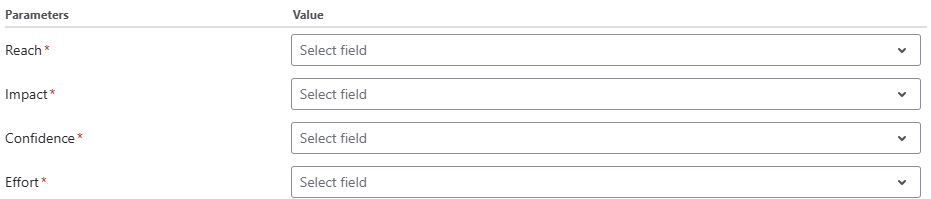
For each of the parameters Reach, Impact, Confidence and Ease, select the field that represents that metric in your instance.
Configuration
To use the RICE Score template, simply select it from the template grid. Filter by Governance & business KPIs to find it faster.
Parameters
To complete the configuration, select values for all parameters.
Edit formula mode
If you click on Edit formula you can see the formula field in the Expression Parser. You can now tweak the expression to create a custom formula field based on this template.
Expression
Jira expression:
((issue?.customfield_RRRRR ?? -1) >= 0 && (issue?.customfield_IIIII ?? -1) >= 0 && (issue?.customfield_CCCCC ?? -1) >= 0 && (issue?.customfield_EEEEE ?? -1) > 0) ? ((issue?.customfield_RRRRR * issue?.customfield_IIIII * issue?.customfield_CCCCC) / issue?.customfield_EEEEE) : null
Replace the IDs with the ones of your number custom fields for Reach (RRRRR), Impact (IIIII), Confidence (CCCCC) and Ease (EEEEE).
Display as
Number
Formatting style
Default (unformatted)
Details
1. What does the expression do?
The expression calculates the RICE score for a work item by multiplying three values: Impact, Confidence, and Ease. Each of these values is stored in a custom field. If any of these fields are empty or negative, the expression does not return a value.
2. Step-by-step breakdown
The expression is:
((issue?.customfield_RRRRR ?? -1) >= 0 && (issue?.customfield_IIIII ?? -1) >= 0 && (issue?.customfield_CCCCC ?? -1) >= 0 && (issue?.customfield_EEEEE ?? -1) > 0) ? ((issue?.customfield_RRRRR * issue?.customfield_IIIII * issue?.customfield_CCCCC) / issue?.customfield_EEEEE) : null
-
issue?.customfield_RRRRR: This retrieves the value of the custom field for Reach from the current work item. The?means it checks safely, so if the field doesn’t exist, it won’t cause an error. -
>= 0: This checks if the value is negative, to make sure only valid input is accepted. -
The same logic applies to
customfield_IIIII(Impact),customfield_CCCCC(Confidence) andcustomfield_EEEEE(Effort). -
If all input is valid, the four values are then combined according to this formula: Reach × Impact × Confidence / Effort.
3. Examples
Suppose you have a work item with these values:
-
Reach: 6
-
Impact: 5
-
Confidence: 8
-
Effort: 3
The ICE score would be:
6 * 5 * 8 / 3 = 80
If Confidence is missing (empty), the calculation would be:
5 * 0 * 3 = 0
because any missing value is treated as 0.
4. Real-life use cases
-
Prioritizing features: Use this formula to quickly score and compare different work items (like features or tasks) based on their potential reach and impact, your confidence in the estimate, and how much effort they take to implement.
-
Backlog grooming: During planning sessions, teams can fill in these four fields for each work item and use the RICE score to decide which items to tackle first.