
This template displays a WSJF priority score for epics and initiatives based on four inputs: Business value, Time criticality, Risk reduction / opportunity enablement, and Job size (effort).
Formula: (Business value + Time criticality + Risk reduction) ÷ Job size
Use it to compare and rank work consistently.
If one of the fields does not have a value, 0 will be displayed.
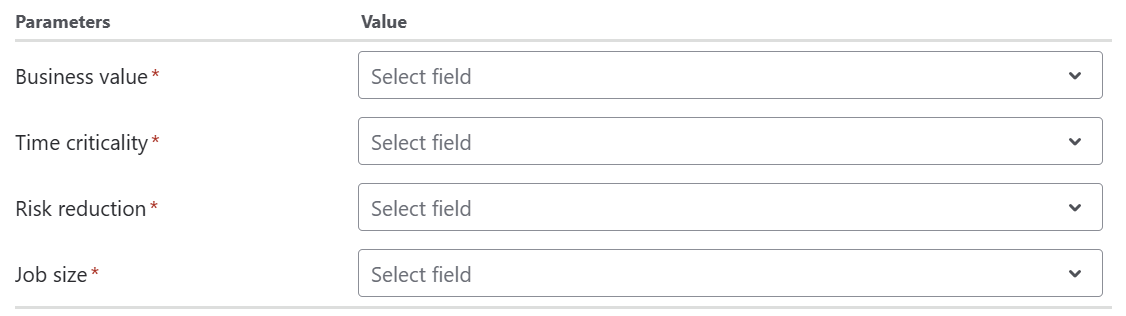
For each of the parameters Business value, Time criticality, Risk reduction, and Job size select the field that represents that metric in your instance.
Configuration
To use the WSJF template, simply select it from the template grid. Filter by Governance & business KPIs to find it faster.
Parameters
To complete the configuration, select values for all parameters.
Edit formula mode
If you click on Edit formula you can see the formula field in the Expression Parser. You can now tweak the expression to create a custom formula field based on this template.
Expression
Jira expression:
((issue?.customfield_BBBBB ?? -1) >= 0 && (issue?.customfield_TTTTT ?? -1) >= 0 && (issue?.customfield_RRRRR ?? -1) >= 0 && (issue?.customfield_SSSSS ?? -1) > 0)
  ? (issue?.customfield_BBBBB + issue?.customfield_TTTTT  + issue?.customfield_RRRRR) / issue?.customfield_SSSSS
  : null
Replace the IDs with the ones of your number custom fields Business value(BBBBB), Time criticality (TTTTT), Risk reduction (RRRRR) and Job size (SSSSS).
Display as
Number
Formatting style
Default (unformatted)
Details
1. What does the expression do?
This expression calculates the WSJF priority score for a work item (such as an epic or initiative) using four custom fields: Business value, Time criticality, Risk reduction, and Job size. The formula helps you rank work items by dividing the sum of the first three factors by the job size.
2. Step-by-step breakdown
The expression is:
((issue?.customfield_BBBBB ?? -1) >= 0 && (issue?.customfield_TTTTT ?? -1) >= 0 && (issue?.customfield_RRRRR ?? -1) >= 0 && (issue?.customfield_SSSSS ?? -1) > 0)
? (issue?.customfield_BBBBB + issue?.customfield_TTTTT + issue?.customfield_RRRRR) / issue?.customfield_SSSSS
: null
-
issue?.customfield_BBBBB: Retrieves the Business value field. The?ensures it doesn't error if the field is missing. -
?? -1: If the field is empty, it uses -1 as a fallback. -
The same logic applies to Time criticality (
customfield_TTTTT), Risk reduction (customfield_RRRRR), and Job size (customfield_SSSSS). -
The first part checks that all three numerator fields are 0 or greater, and that Job size is greater than 0.
-
If all checks pass, it calculates: (Business value + Time criticality + Risk reduction) ÷ Job size.
-
If any field is missing or invalid, the result is
null(no score shown).
3. Examples
-
If Business value = 8, Time criticality = 5, Risk reduction = 3, Job size = 2:
-
(8 + 5 + 3) / 2 = 16 / 2 = 8
-
-
If Job size is 0 or missing, the score is not calculated (returns null).
4. Real-life use cases
-
Prioritizing large initiatives or epics by their potential value and urgency versus the effort required.
-
Comparing multiple work items to decide which to tackle first in portfolio or program management.