
The main goal of the properties is to provide project metadata, which can be referenced and used in multiple JWT features.
Format of JWT project properties
A JWT project property can be added to any project description in the following format:
{propertyKey=propertyValue}
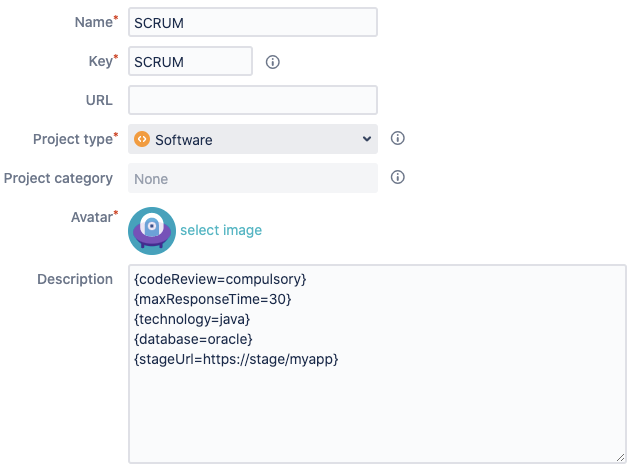
The screenshot shows an example with 5 JWT project properties:
|
Property key |
Property value |
Potential use case |
|---|---|---|
|
codeReview |
compulsory |
Could be used to enforce certain parts of the workflow related to code reviews using Condition on JWT project property or Validation of JWT project property. |
|
maxResponseTime |
30 |
Could be used to set individual SLA times per project. These could be used in combination with JWT JQL functions to set up filter subscription or to automatically update an issue priority using an Update field action. |
|
technology |
java |
Could be used in many JWT functions or expressions using the Advanced text mode. |
|
database |
oracle |
Could be used in many JWT functions or expressions using the Advanced text mode. |
|
stageURL |
https://stage/myapp |
Could be used in many JWT functions or expressions using the Advanced text mode. |
JWT project properties and workflows
Project properties were initially aimed at customizing your workflow behavior depending on project features (metadata added to projects in the form of project properties).
For example you can use project properties to:
-
Enable/disable transitions depending on project property values.
-
Set project customized values for timelines (dates), costs, weights, or any other date/numerical values used in your workflows. Can also be used for implementing non-numerical or non-date attributes.
-
Set priorities among projects, that may be inherited by issues, for example by using priority adjustment tables.
-
Provide project related metadata that may be used by the workflow post functions to compose project customized dynamic text, setting custom or virtual fields with project customized values, etc, e.g., customer information, servers URLs, etc.
Conditions and Validators
Post functions
Logical expressions
JWT project properties can be referenced and validated when writing a logical expression in the Logical mode (e.g in the conditional execution parameter of post functions).
Available functions
JWT provides special parser functions to work with JWT project properties.
| Function | Short description | Output |
|---|---|---|
| defaultUserForRole() |
Returns the user name of the default project role user. |
text |
| groupsUserBelongsTo() |
Returns all groups for given users. |
text list |
| projectKey() |
Returns the project key from a given project. |
text |
| nextUserInGroup() |
Returns the name of the next active user in a group. |
text |
| displayNameToUser() |
Returns the user name for a given user. |
text |
| rolesUserPlays() |
Returns all project roles for given users. |
text list |
| projectIDFromKey() |
Returns the internal ID for given project keys. |
text |
| leastBusyUserInRole() |
Returns the name of the user in a given project role with the lowest number of unresolved issues assigned. |
text |
| projectLeader() |
Returns the project lead |
text |
| usersWithEmail() |
Returns the user names of users matching a given email address. |
text list |
| isActive() |
Checks whether users are active |
boolean |
| projectLead() |
Returns the project lead |
text |
| projectKeys() |
Returns specific project keys. |
text list |
| isAClone() |
Checks whether an issue is a clone. |
boolean |
| componentLeads() |
Returns the user name(s) of specified component leads |
text |
| usersInGroup() |
Returns the user names of active users in a given group. |
text list |
| allCommenters() |
Returns all comment authors and updaters |
text list |
| getUserKey() |
Returns the user key of a given user. |
text |
| projectPropertyExists() |
Checks whether a project property exists. |
boolean |
| projectType() |
Returns the type of a given project. |
text |
| attachmentUrls() |
Returns all attachment URLs of the given issue(s). |
text list |
| allCommentDates() |
Returns the dates of specified comments |
number list |
| userProperty() |
Returns the values of user properties. |
text |
| userFullName() |
Returns the full name of a given user. |
text text list |
| isJwtTriggeredTransition() |
Checks whether a transition was executed by a JWT post function. |
boolean |
| isInGroup() |
Checks whether users are a member of a specific group. |
boolean |
| usersWhoTransitioned() |
Returns the names of the users who executed a certain transition. |
text list |
| filledInTransitionScreen() |
Checks whether a selected field has has been populated on the transition screen. |
boolean |
| projectName() |
Returns the name of a given project. |
text |
| issueKeyFromID() |
Returns the issue key for given issue IDs. |
text |
| timesOfTransition() |
Returns the timestamps of when a certain transition was executed. |
number list |
| userDisplayName() |
Returns the full name of a given user. |
text text list |
| lastAssigneeInRole() |
Returns the user name of the last assignee in a given project role. |
text |
| issueIDFromKey() |
Returns the internal ID for given issue keys. |
text |
| allCommentCreators() |
Returns all comment creators |
text list |
| isBulkTriggeredTransition() |
Checks whether a transition was executed by a bulk operation. |
boolean |
| usersInRole() |
Returns members of a given project role. |
text list |
| allComments() |
Returns defined comments |
text list |
| userEmail() |
Returns the email address(es) of given users. |
text text list |
| fullNameToUser() |
Returns the user name for a given user. |
text |
| isInRole() |
Checks whether users are a member of a specific project role. |
boolean |
| projectProperty() |
Returns the value of a given project property. |
text |
| projectCategory() |
Returns the project category of a given project. |
text |
JWT project properties and JQL
You can use JWT project properties in JQL queries, by using any of the JQL functions provided by Jira Workflow Toolbox:
| Function | Short description | Output |
|---|---|---|
| projectsWhereDateProperty() |
Returns projects with specific properties containing a date |
text list |
| usersWithDateTimeProperty() |
Returns users with specific date or date-time properties. |
text list |
| projectsWhereNumberProperty() |
Returns projects with specific numeric properties. |
text list |
| projectsWhereTextProperty() |
Returns projects with specific text properties. |
text list |
Setting the default assignee for a project role
You can use JWT project properties in the Assign to project role post function for setting a default assignee for a specific project role.
📚 Use cases and examples
| Title | Workflow function | Parser functions |
|---|---|---|
| Assign issue to the default user of a role | ||
| Set custom IDs for each issue | ||
| Calculate custom sequence numbers |