Use case
This calculated field returns Yes, if the current issue was resolved before the expected due date, and No if the issue was resolved too late or is currently overdue.
🛠️ Configuration
Create a new Calculated Text Field (by JWT) custom field and name it properly.
Providing a description will help you to identify what the custom field does but this step is optional
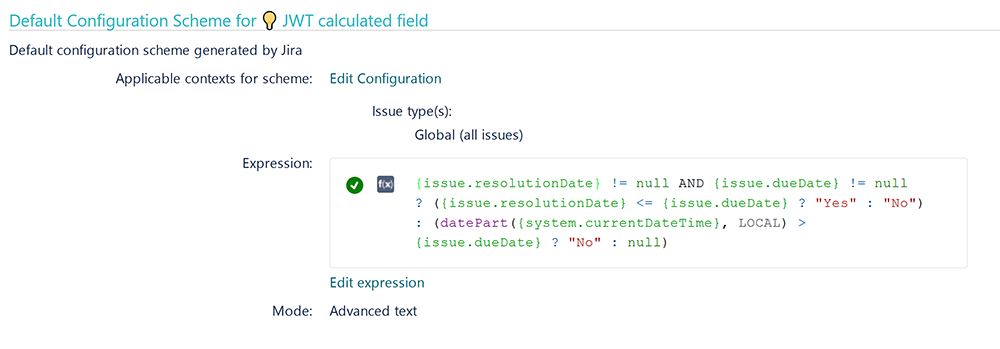
Set the Parsing Mode to Advanced text
Parser expression
Add the following expression:
Text to be parsed for Calculated Text Field:
{issue.resolutionDate} != null AND {issue.dueDate} != null						#Only calculate a value if both dates are set
? ({issue.resolutionDate} <= {issue.dueDate} ? "Yes" : "No") 					#Check whether the resolution date was before the due date
: (datePart({system.currentDateTime}, LOCAL) > {issue.dueDate} ? "No" : null)	#Check whether the unresolved issue is overdue
This expression will only return No if the issue was either resolved too late or is unresolved and overdue.
Yes will only be returned if the issue was resolved before the due date.
To achieve this, the following functions are used:
-
Conditional operator
Add the field to the relevant view screens.
Remember: All calculated fields are read-only and cannot be manually updated on a create or edit screen.
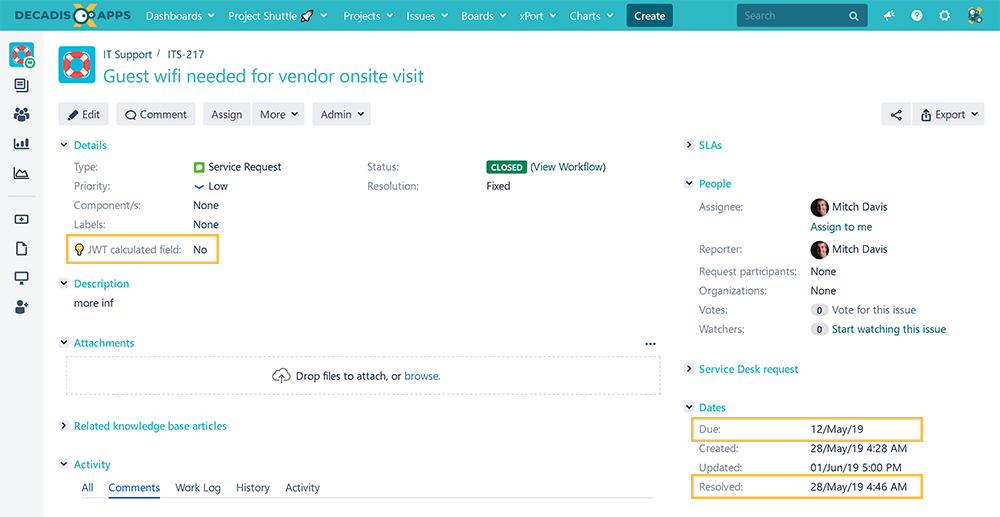
Check the results
Once configured and added to an issue screen, the result will look like this: