Use case
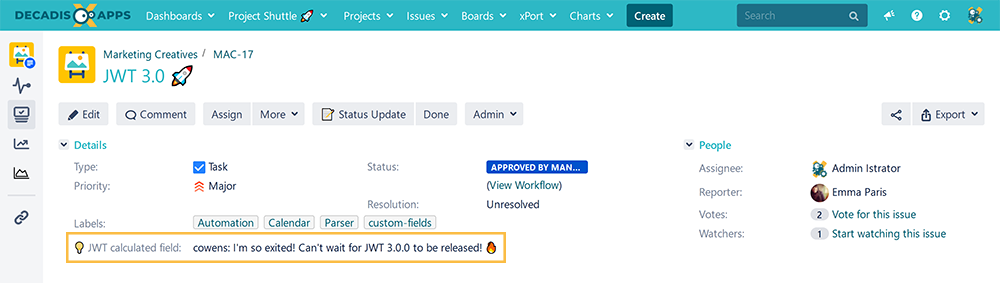
This calculated field returns the user who has last commented on the issue and the comment itself.
🛠️ Configuration
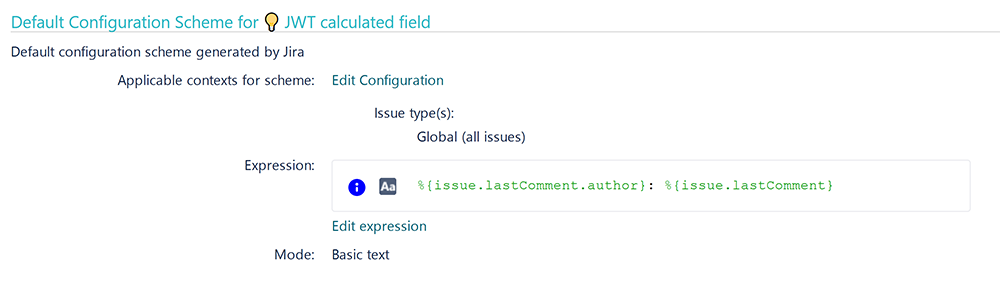
Create a new Calculated Text Field (by JWT) custom field and name it properly.
Providing a description will help you to identify what the custom field does but this step is optional
Parsing mode
Select Basic text as parsing mode.
Parser expression
Add the following expression:
Text to be parsed for Calculated Text Field:
Bash
%{issue.lastComment.author}: %{issue.lastComment}
Add the field to the relevant view screens.
Remember: All calculated fields are read-only and cannot be manually updated on a create or edit screen.
Check the results
Once configured and added to an issue screen, the result will look like this: