Use case
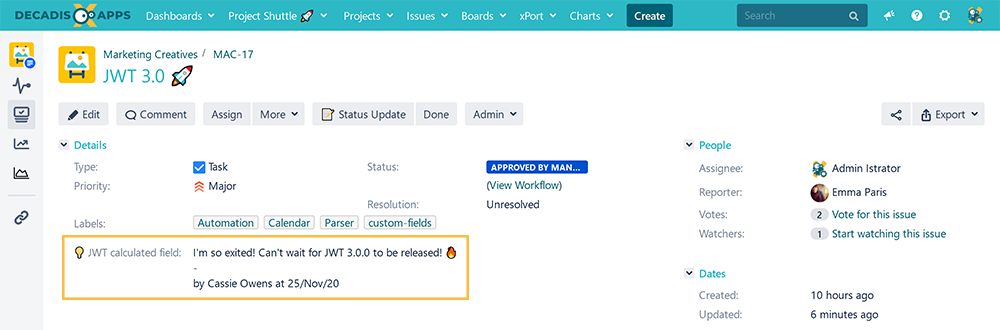
This calculated field returns the last comment, its author, and a timestamp in a text field.
⚒️ Configuration
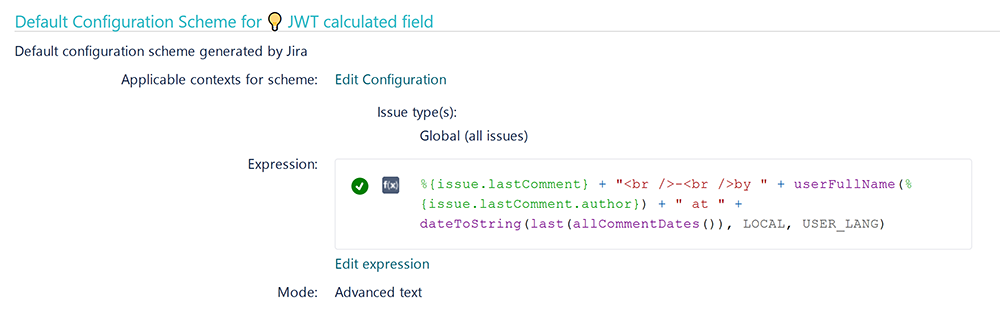
Create a new Calculated Text Field (by JWT) custom field and name it properly.
Providing a description will help you to identify what the custom field does but this step is optional.
Parsing mode
Select Advanced text as parsing mode.
Parser expression
Add the following expression:
%{issue.lastComment} + "<br />-<br />by " + userFullName(%{issue.lastComment.author}) + " at " + dateToString(last(allCommentDates()), LOCAL, USER_LANG)
# Example output:
# Sounds reasonable!
# -
# by John Doe at 17/Nov/20
Add the field to the relevant view screens.
Remember: All calculated fields are read-only and cannot be manually updated on a create or edit screen.
Check the results
Once configured and added to an issue screen, the result will look like this:
📚 Related use cases
| Title | Field type | JWT feature | Label |
|---|---|---|---|
| Check if an issue was resolved on time | Text |
(input latin letters) |
|
| Components from all sub-tasks |
(input latin letters) |
|
|
| Details of the last comment | Text |
(input latin letters) |
STAFF PICK |
| Difference between two dates in business days | Text |
(input latin letters) |
|
| Display additional details of the issue creator |
(input latin letters) |
|
|
| Display current issue's project category |
(input latin letters) |
|
|
| Display historic due dates |
(input latin letters) |
|
|
| Display reporters of linked Cloud issues | Text |
(input latin letters) |
|
| Google Maps location | Text |
(input latin letters) |
STAFF PICK |
| Highest ranked custom field value among all linked issues | Text |
(input latin letters) |
|
| Last comment, its author, and timestamp | Text |
(input latin letters) |
STAFF PICK |
| Last commenter's full name | Text |
(input latin letters) |
|
| Status and assignee of parent issue |
(input latin letters) |
|