Use case
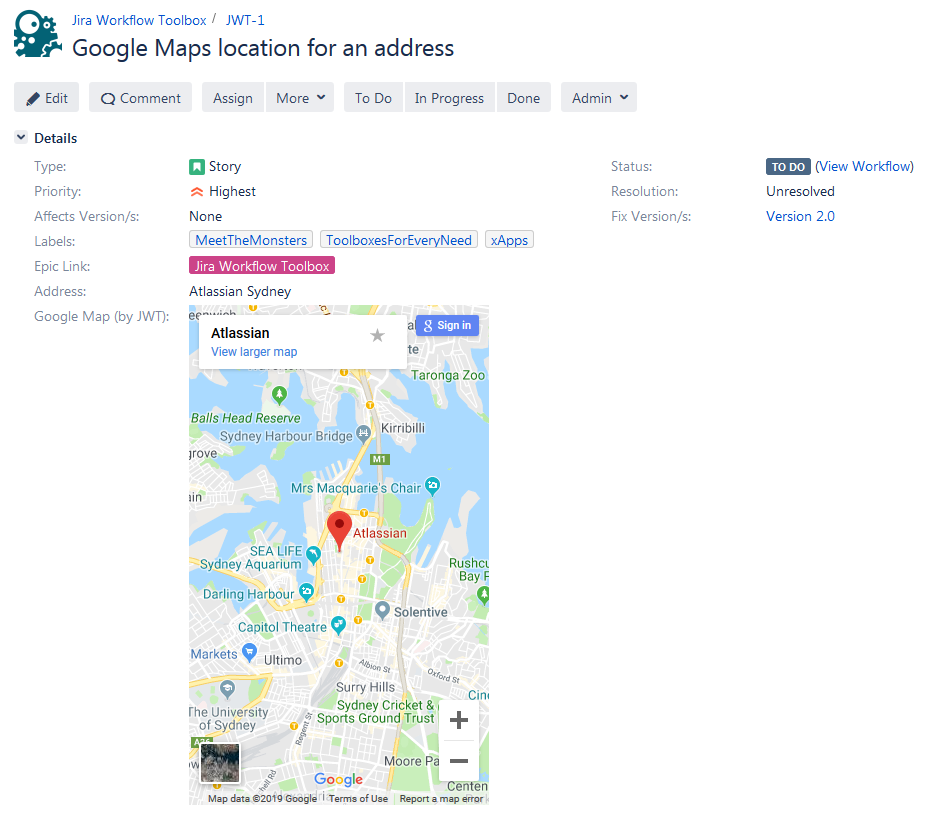
This calculated field returns the Google maps location for a given address.
🛠️ Configuration
Create a new Calculated Text Field (by JWT) custom field and name it properly.
Providing a description will help you to identify what the custom field does but this step is optional
Parsing mode
Select Advanced text as parsing mode.
Parser expression
Add the following expression:
Text to be parsed for Calculated Text Field:
Bash
%{issue.cf10407} != null ? "<iframe width=\"100%\" height=\"500\" id=\"gmap_canvas\" src=\"https:\/\/maps.google.com\/maps?q=" + replaceAll(toLowerCase(%{issue.cf10407})," ","%20") + "&t=&z=13&ie=UTF8&iwloc=&output=embed\" frameborder=\"0\" scrolling=\"no\" marginheight=\"0\" marginwidth=\"0\"><\/iframe>" : null
%{issue.cf10407} is the field code for the custom field Address, which is a text Field (single line). The field in the example simply contains: "Atlassian Sydney".
Add the field to the relevant view screens.
Remember: All calculated fields are read-only and cannot be manually updated on a create or edit screen.
Check the results
Once configured and added to an issue screen, the result will look like this: