
The logical parsing mode is used to construct logical expressions.
To construct these logical expressions, you can combine different elements, such as field codes, JWT expression parser functions and operators. The result must always return one of two distinct boolean values: true or false.
Currently the only place where you can use the logical mode is the conditional execution parameter in Post functions.
Compared to the General mode, the logical parsing mode is quite more powerful since next to field codes and JWT expression parser functions it also supports the most common Operators (JWT expressions) which can be used to compare values.

📚 Example expressions
|
Parser expression |
Description |
|---|---|
|
This example returns:
|
|
This example returns:
|
Expressions can be combined or linked using operators to construct complex logical comparisons.
|
Parser expression |
Description |
|---|---|
|
This example returns:
|
|
This example returns:
|
In the logical parsing mode only field codes have to be enclosed by %{} and {} respectively. JWT expression parser functions can be used without enclosing brackets.
Comparison operators
The operators, their meaning and the applicable data types you can use them with are listed below.
A comparison always returns a boolean value.
Overview of all case-sensitive comparison operators
All operators respect the case of the characters.
|
Operator |
Meaning |
Examples (all examples return |
|---|---|---|
|
|
equal to |
Bash
When working with Lists, each elements' existence and its order are being evaluated. |
|
|
not equal to |
Bash
When working with Lists, each elements' existence and its order are being evaluated. |
|
|
less than |
Bash
|
|
|
greater than |
Bash
|
|
|
less than or equal to |
Bash
|
|
|
greater than or equal to |
Bash
|
|
|
contains |
Bash
|
|
|
does not contain |
Bash
|
|
|
is contained in |
Bash
|
|
|
is not contained in |
Bash
|
|
|
any element is in |
Bash
|
|
|
no single element is in |
Bash
|
When comparing lists, the exact number of occurence (cardinality) per element must match.
|
Parser expression |
Output |
Description |
|---|---|---|
|
Bash
|
|
This expression returns |
|
Bash
|
|
This expression returns |
Applicable data types
Below you find a comprehensive matrix of all operators and applicable data types .
|
Operator |
BOOLEAN |
number |
Text |
number list |
text list |
issue list |
|---|---|---|---|---|---|---|
|
|
✅ |
✅ |
✅ |
✅ |
✅ |
✅ |
|
|
✅ |
✅ |
✅ |
✅ |
✅ |
✅ |
|
|
- |
✅ |
✅ |
- |
- |
- |
|
|
- |
✅ |
✅ |
- |
- |
- |
|
|
- |
✅ |
✅ |
- |
- |
- |
|
|
- |
✅ |
✅ |
- |
- |
- |
|
|
- |
- |
✅ |
✅ |
✅ |
✅ |
|
|
- |
- |
✅ |
✅ |
✅ |
✅ |
|
|
- |
- |
- |
✅ |
✅ |
✅ |
|
|
- |
- |
- |
✅ |
✅ |
✅ |
|
|
- |
- |
- |
✅ |
✅ |
✅ |
|
|
- |
- |
- |
✅ |
✅ |
✅ |
Things to be aware of
Please be aware the both operands of the respective comparison must have the same data type. The only exceptions are the following:
-
Automatic casting from number to text : Whenever you write a numeric term at the right-hand side of a comparison operator like =, and the left-hand side is occupied by a text term, the parser will automatically transform the right-hand side term into a text (e.g. "30" = 30 will be interpreted the same way as "30" = "30")
-
Single values as operand in list operations: Operators
~, !~, inandnot incan be used for checking a single element ( number or text ) against a number list or a text list -
Comparison with the null value: A field which is not set or an empty text is interpreted as null. A number field, which doesn't contain a number, is also interpreted as
null.
Things to remember
|
Remember |
Examples |
|---|---|
|
Operators |
Bash
|
|
Operators |
Bash
|
|
Operators |
Bash
|
|
Operators |
Bash
|
|
Operators |
Bash
|
Logical operators
The table below lists all logical operators that can be used for linking logical terms in an expression.
They take logical terms (which return boolean values) as operands and can thus be built using:
-
a boolean value
-
a JWT expression parser function returning a boolean value
-
a comparison
-
a logical term enclosed by brackets ()
-
two logical terms connected with a logical operator, where boolean literals and comparisons themselves are logical terms.
Logical operators can only be used in logical expressions in the Logical mode or in combination with the conditional operator.
Overview of all logical operators
|
Operator |
Meaning |
Precedence |
|---|---|---|
|
|
logical negation |
1 (highest) |
|
|
logical conjunction |
2 |
|
|
logical disjunction |
3 |
|
|
exclusive or, i.e., |
3 |
|
|
logical implication, i.e., |
4 |
|
|
logical equivalence, i.e., |
4 (lowest) |
A single logical term can be enclosed by brackets () in order to increase the readability of the expressions or to define a precedence which differs from the given one.
Logical operators can also be written in lower case (e.g. and, or)
Conditional operator
The conditional operator, ?-operator, is a powerful one to construct conditional expressions.
It basically allows you to construct the following expression: IF logical_expression true THEN term_1 ELSE term_2.
<logical_expression> ? <term_1> : <term_2>
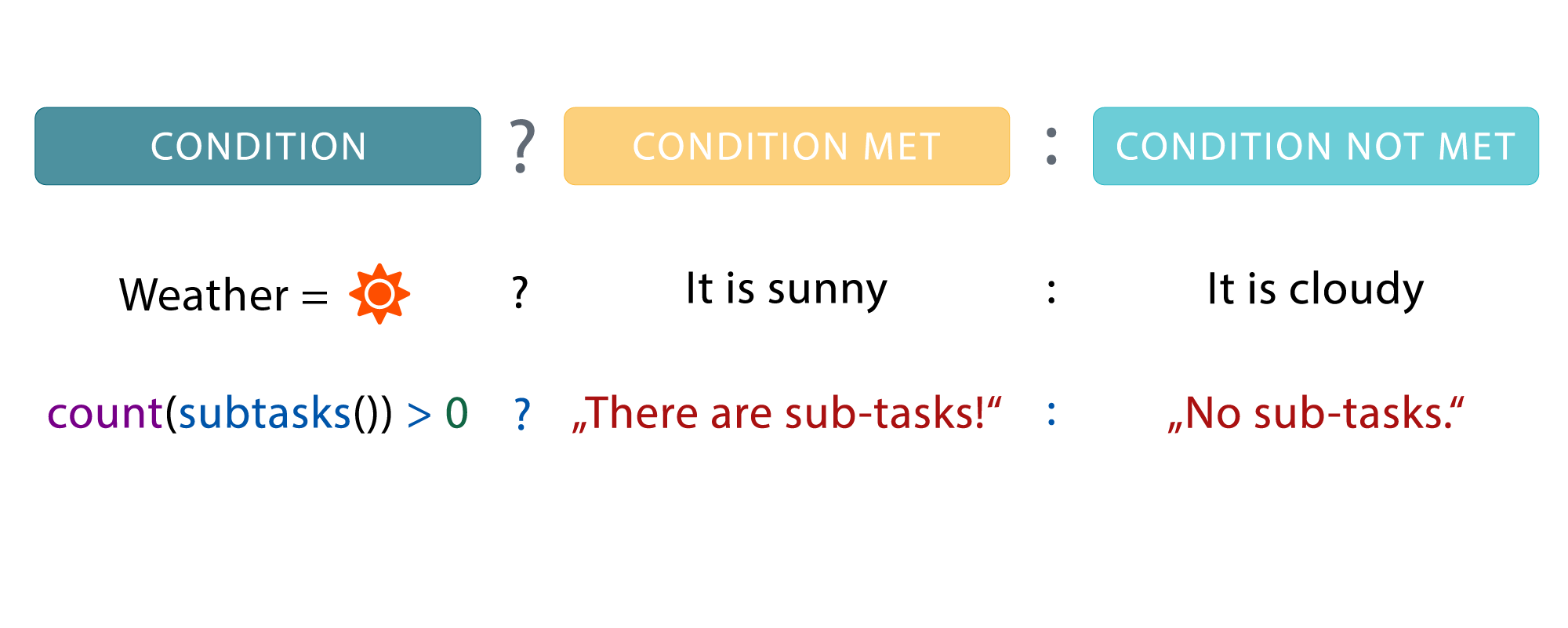
Examples of using the conditional operator
|
Expression |
Description |
|---|---|
|
IF the priority of an issue is Highest, THEN this function will return the text "Please have a look at this issue immediately" ELSE it will return the text "No stress, come back later". |
|
IF an issue does have a due date set (due date is not null), THEN this function will return the number of hours from the current date-time to the due date ELSE it will return the number |
|
IF a custom field (e.g. a select list) has a value of Red, THEN this function will return the text Color, ELSE it will return No color. |
|
IF the current time is between 21:00 and 7:00 THEN this function will return the text "Night" , ELSE it will return the text "Day". |