
Execute sequence of actions allows you to group and execute multiple post functions in a defined order during a workflow transition. Unlike native Jira, it lets you control the execution order. Additionally, it enables advanced automation by passing data dynamically between post functions using Temporary fields (Text/Number). By grouping post functions in one place, you can configure and manage them more efficiently without creating multiple separate functions, simplifying workflow maintenance.
🛠️ Configuration
Notes
You can optionally enter a short Note (limited to 80 chars) and a longer Explanation (limited to 500 chars) to summarize what you are using the function for. This can help you differentiate multiple functions of the same kind in a single transition, as the Note will be shown in the workflow transition view.
Adding and ordering actions
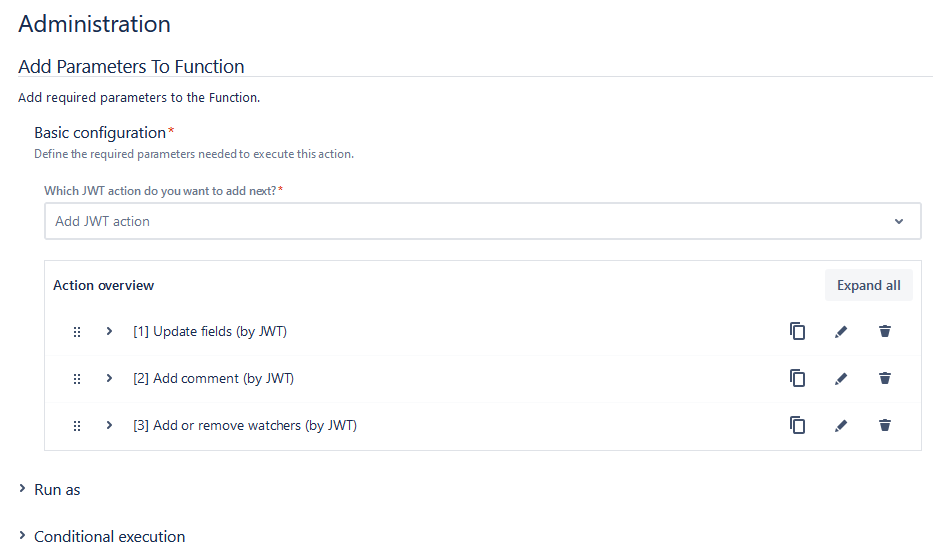
You can select and arrange post functions in a sequence to meet your specific workflow requirements. Use the JWT action picker to select one or more post functions. After selecting a post function, you will be prompted to configure it on a separate screen, similar to configuring standard post functions.
Each post function can be customized to suit your needs. To differentiate between different functions of the same type, you can set the Note in their respective configuration and it will be shown as the name in the list of functions. You can expand individual post functions by clicking the arrows next to them to view more details, or use Expand all to open all sections at once. Configuration details for each function are available on their respective setup pages. At Post functions you can find a general overview.
Once the configuration is complete, you can reorder the post functions. On the left side of the configuration screen, you will see dots that allow you to drag and drop the post functions. Use this feature to adjust their execution priority. You also can edit, copy, or delete post functions at any time to refine your workflow as needed. When you copy a post function, it is always added to the end of the list.
Run as
The configured user must have all necessary permissions to add or remove watchers in the target issue.
The selected user must have logged in at least once.
Select the user that will be used to execute the post function. By default, it is set to the current user that executes the transition.
The following options are available:
|
Option |
Description |
|---|---|
|
Selected user |
Select a specific Jira user. |
|
User in field |
Select the field containing the user that will be used to execute the post function. |
Conditional execution
You can optionally specify a logical expression or a Jira expression depending on the chosen Parsing mode to define the circumstances (or conditions) under which the post function should be executed.
The result of the logical expression must return a boolean value of either:
-
true→ the post function will be executed -
false→ the post function will not be executed
Using the conditional operator, even complex or multi-layered conditions can be constructed.
Make sure to learn more about defining logical expressions and browse through the various examples here: Logical mode
📚 Use cases
| Use case | Workflow function | Parser functions | Use case description |
|---|---|---|---|
| Create IT tasks and add watchers for onboarding |
When a service request is submitted in the HR project, three IT tasks for providing the necessary work equipment are automatically created in the IT project, with the HR group added as watchers to ensure a structured and trackable onboarding process. |
||
| Automate sub-task creation with controlled sequence |
Ensure a strict task sequence by scheduling four subtasks one week apart, each blocked by the previous one. This guarantees controlled execution and clear dependencies. |
Include Temporary fields
Temporary fields are exclusively available and stored within the scope of the Execute sequence of actions wrapper. This feature provides a way to pass temporary data between post functions using Temporary fields, which are designed to store intermediate values for subsequent post functions in the same sequence. Two types are available: text and numbers.
|
Option |
Description |
|---|---|
|
These fields hold temporary text values, whether returned by a post function or defined within post functions. These values can then be referenced in subsequent post functions to pass information such as comments, summaries, or custom text strings. |
|
|
These fields hold temporary numeric values (including date-time values), whether returned by a post function or defined within post functions. They can be used to perform calculations, pass timestamps, or manage numeric data between functions. |
How to use Temporary fields
-
Set Temporary fields:
When configuring an Execute sequence of actions wrapper, you can define Temporary text or number fields within the post functions inside the wrapper just like any other field. -
Pass data between post functions:
Temporary fields store values returned by one post function and make them available for use in subsequent post functions in the same sequence. This allows you to chain logic dynamically.
When working with Temporary number/text fields in the Execute sequence of actions wrapper, it's important to understand that these fields are only available within this wrapper and only during runtime. This limitation means that testing expressions involving temporary fields can not show results as intended.
Store results of Post functions in Temporay fields
In the Create issue post function, you can use the Additional options section to specify one of the Temporary text fields (1–5) to store the issue key of the newly created issue. This allows you to use the issue key in subsequent post functions during the same transition. Linking back to the newly created issue allows a subsequent post function to retrieve its data. This makes it possible to calculate a due date or reuse other fields based on the issue created.
Similarly, in the Send email post function, the Additional options allow you to store the From, To, and Email body details in selected Temporary text fields (1–5). These fields can then be referenced by other post functions for dynamic data reuse, such as generating comments or notifications.
Run as
The selected user must have logged in at least once.
Select the user that will be used to execute the post function. By default, it is set to the current user that executes the transition.
The following options are available:
|
Option |
Description |
|---|---|
|
Selected user |
Select a specific Jira user. |
|
User in field |
Select the field containing the user that will be used to execute the post function. |
This Run as user can be inherited to the sub post functions while configuring them, for that the user should select the option Inherited User from User in field.
Conditional execution
You can optionally specify a logical expression or a Jira expression depending on the chosen Parsing mode to define the circumstances (or conditions) under which the post function should be executed.
The result of the logical expression must return a boolean value of either:
-
true→ the post function will be executed -
false→ the post function will not be executed
Using the conditional operator, even complex or multi-layered conditions can be constructed.
Make sure to learn more about defining logical expressions and browse through the various examples here: Logical mode
In the Execute sequence of actions wrapper, Conditional executions can be applied to each individual Post function. This means that you can define specific conditions for each Post function to determine whether it should be executed. At the wrapper level, a Conditional execution applies to all the Post functions it contains, meaning that they will only be executed if the condition of the wrapper is met.
In addition, Conditional executions set at the Post function level are combined using a logical AND. This means that, for a Post function to be executed, both the condition defined at the wrapper level (if any) and the condition defined at the Post function level must be met.
By combining multiple Post functions with their own conditions, you can create highly flexible workflows where different actions are triggered sequentially based on dynamic criteria. This allows you to handle multiple scenarios within a single transition, ensuring that only the relevant Post functions are executed in the desired order.