Summary
In a Jira cloud setting, sales opportunities are tracked as Jira work items with custom number fields for sales target and closed revenue. A custom formula column in the Grouped Filter Results gadget groups opportunities by account owner and calculates the remaining revenue required to reach the assigned target.
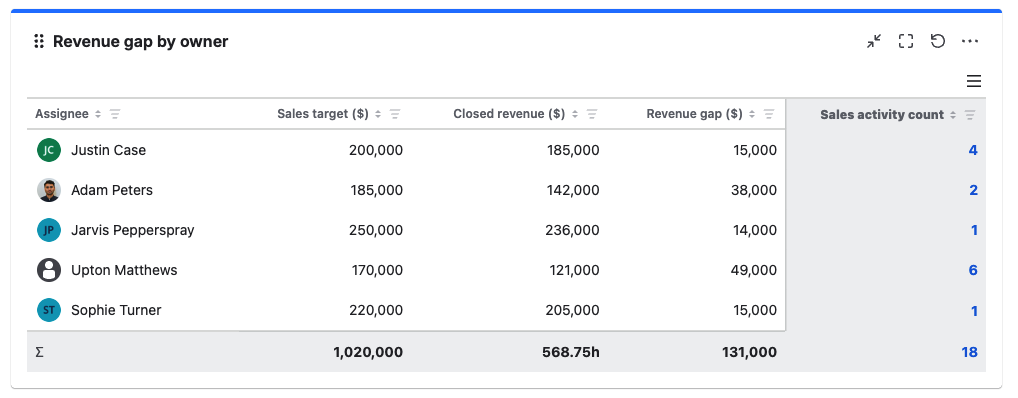
Business value: Sales managers can quickly identify which account owners are below target and how large the remaining gap is. This supports focused pipeline reviews, better forecasting, and timely intervention before the reporting period ends.
Configuration
Explanation of this use case
Each sales opportunity is represented by a work item that contains the following key fields. All the fields have been created and populated in advance.
-
Sales target: A custom number field that records the revenue target associated with each sales activity or account owner for the reporting period.
-
Closed revenue: A custom number field that records the final revenue generated from a successfully closed sales activity.
-
Sales activity count: The work item count renamed to represent each of the sales activity.
-
Assignee: A system field “Assignee“ to show the sales representative responsible for a given sales activity.
Formula column
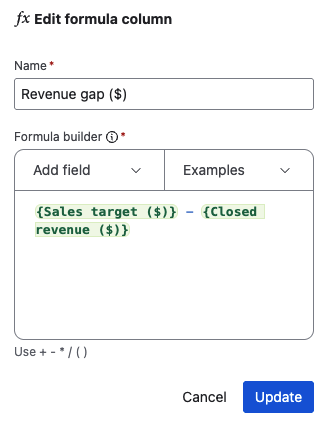
Target achievement = {Sales target} - {Closed revenue}
The gadget sums the sales target and closed revenue for each account owner. It then subtracts the grouped closed revenue from the grouped sales target.
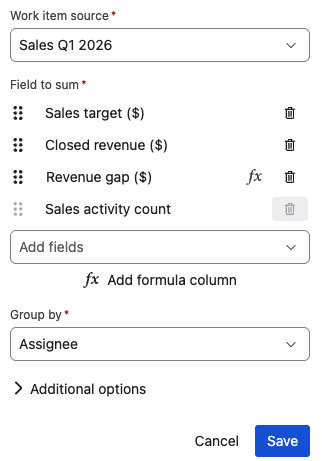
Please configure the Grouped Filter Results gadget as shown in the screenshot below to realize this use case.
Gadget configuration
Formula column configuration