Summary
Marketing campaigns are managed as Jira work items with separate custom number fields for approved budget, actual campaign cost, and committed cost. The gadget groups campaigns by marketing channel and calculates how much budget remains available after both completed and planned spending are considered.
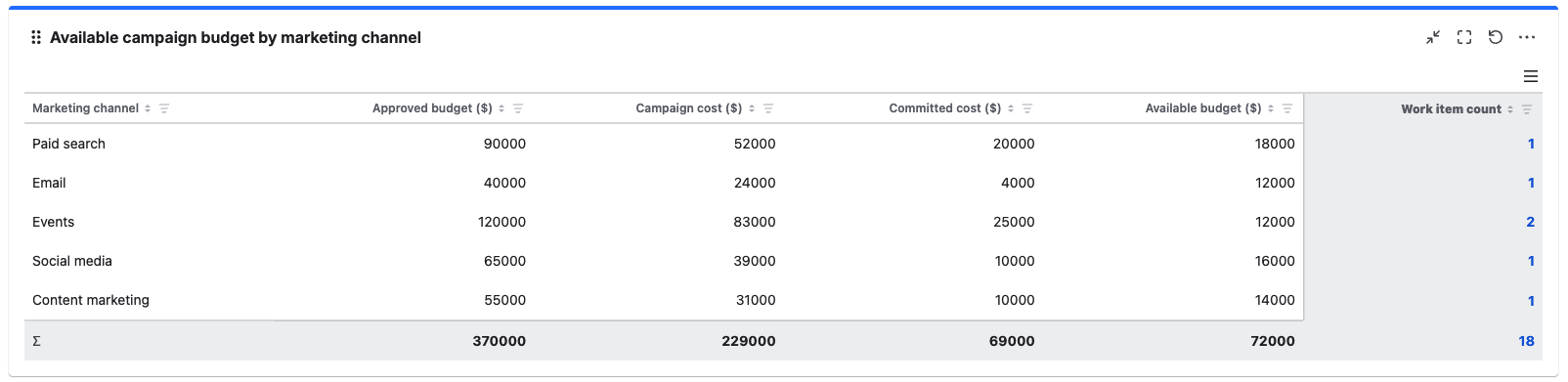
Business value: Marketing teams gain a more realistic view of available budget because committed expenses are included alongside costs already incurred. This helps prevent accidental overspending and supports better allocation of funds across upcoming campaigns.
Configuration
Explanation of this use case
Each marketing activity is represented by a work item that contains the following key fields. All the fields have been created and populated in advance.
-
Approved budget: A custom number field that records the total amount allocated to each campaign activity.
-
Campaign cost: A custom number field that records expenses already incurred for each campaign activity.
-
Committed cost: A custom number field that records approved or contacted expenses that have not yet been invoiced or paid.
-
Group by field: Marketing channel: A custom select field that categorises campaigns as Paid search, Email, Events, Social media, Content marketing, or another relevant channel.
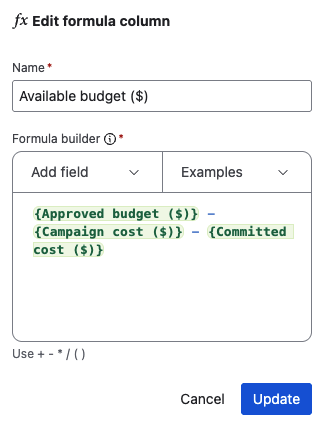
Formula column:
Available budget = {Approved budget} - {Campaign cost} - {Committed cost}
The gadget first aggregates all three fields for each marketing channel. It then subtracts both the actual and committed costs from the approved budget to calculate the amount still available.
Please configure the Grouped Filter Results gadget as shown in the screenshot below to realize this use case.
Gadget configuration
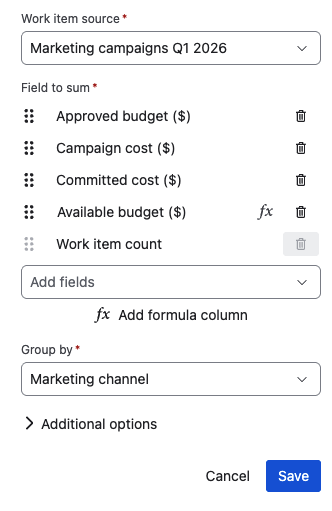
Formula column configuration