Use case
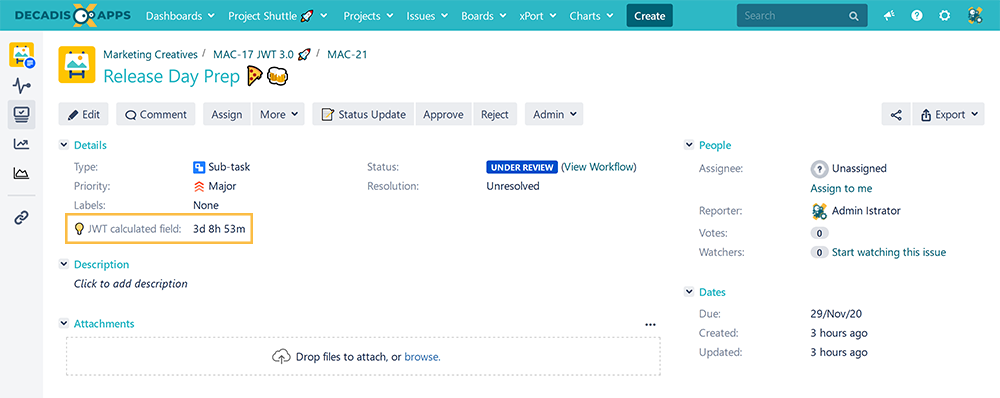
This calculated field returns the time left before an issue is due, if a due date has been set.
🛠️ Configuration
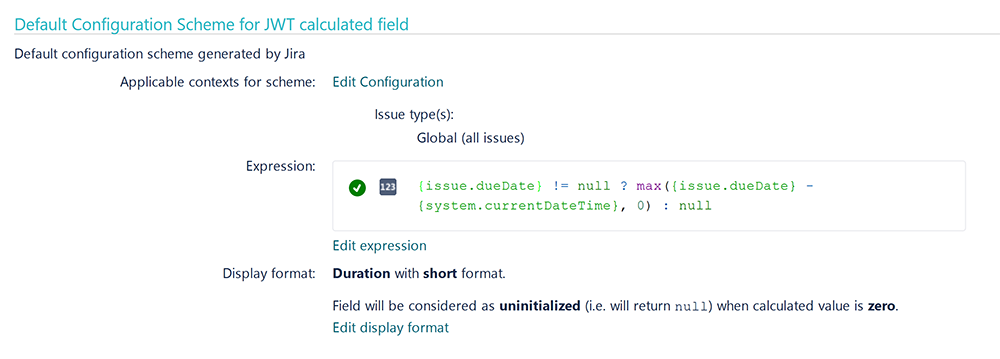
Create a new Calculated Number Field (by JWT) custom field and name it properly.
Providing a description will help you to identify what the custom field does but this step is optional
Parser expression
Add the following expression:
Math expression for Calculated number field:
{issue.dueDate} != null ? max({issue.dueDate} - {system.currentDateTime}, 0) : null
To achieve this, the following functions are used:
-
Conditional operator
-
max() is used to avoid returning a negative duration when the Due date has passed.
Display format
Choose Duration as Content type
Choose Short as Duration display format
For this use case the format duration was chosen, since the numeric value being calculated, a number of milliseconds, represents a time duration.
This way the value is represented like 2d 9h 43m instead of a single number.
Check the parameter Uninitialized when calculated value is zero
This parameter is set to stop calculation once the Due Date has been reached.
Add the field to the relevant view screens.
Remember: All calculated fields are read-only and cannot be manually updated on a create or edit screen.
Check the results
Once configured and added to an issue screen, the result will look like this: