
Use case
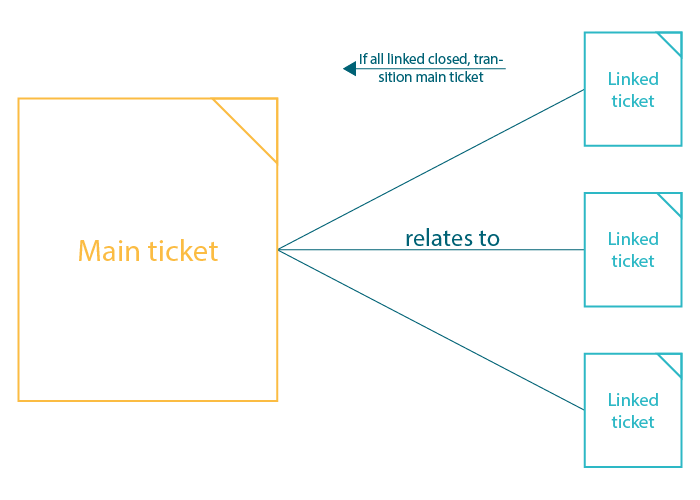
This configuration can be used to automatically transition an issue as soon as all related issues are in a specific status:
🛠️ Configuration
Post function placement
The post function has to be added to the transition that is used to close the related issues, not on the main issue's workflow!
Target issue*
Select JWT expression
%{linkedIssues("<link type 1>, <link type 2>")}
For the expression, the linkedIssues() expression parser function is used.
Replace <link type 1> and <link type 2> (or enter only one) with the link types you want to check for: Linked issue → <link type> → Main issue
Mode*
Select Transition to status and Done as the status.
This is the status to which the main issue will then be transitioned.
Please note that the transition of the correct target workflow is selected.
Delayed execution*
Set it to 500 .
Executing the post function will be delayed by 500 milliseconds.
500ms is the default value and should be completely fine for this use case.
Run as*
Choose which user* will be used to execute the post function. By default, it is set to the Current user.
The user must have all necessary permissions to execute the transition.
Conditional execution
Select the Jira expression mode and insert the following expression:
issue.links[0].linkedIssue.links
.filter(link => link.type.name == "<link type Relation>")
.every(link => link.linkedIssue.status.name == "<status>")
more info...
This expression is the important part of the post function. It does the following:
-
Grab the linked issue (since this post function is placed on the linked issue, this would return the main issue)
-
From that issue: Grab all issues that are linked with type <link type Relation>
-
From those linked issues: Check that all of them are in status <status>
Example:
-
Main issue
-
Linked issue 1
-
Linked issue 2
-
Linked issue 3
-
-
All 3 issues are linked with type <link type Relation>
-
As soon as all linked issues have been transitioned to <status>, the main issue will be transitioned to the status specified in step 2
You can find the name of the link type relation when going to your Jira Administration → Issue linking:
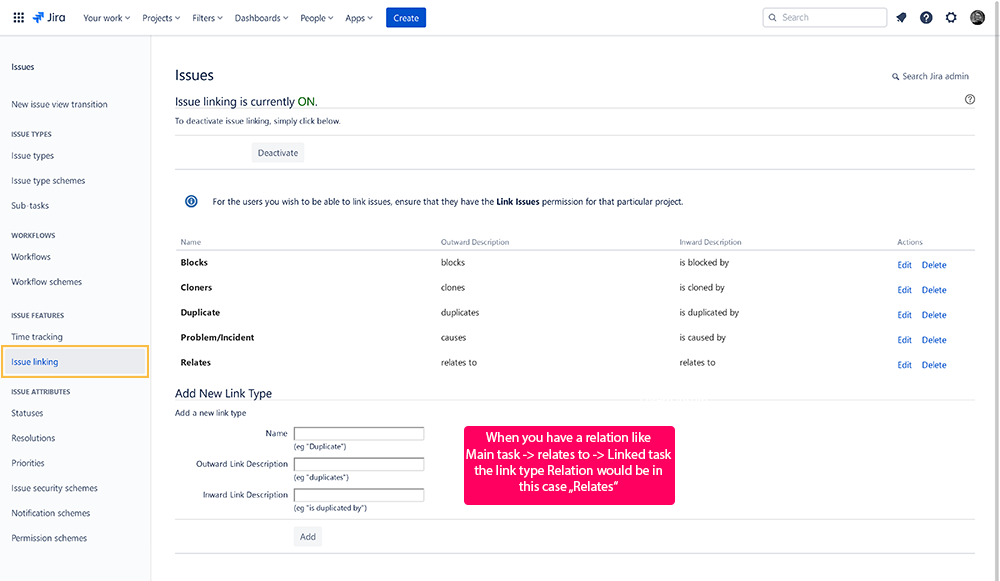
An example would be:
issue.links[0].linkedIssue.links
.filter(link => link.type.name == "Relates")
.every(link => link.linkedIssue.status.name == "Done")