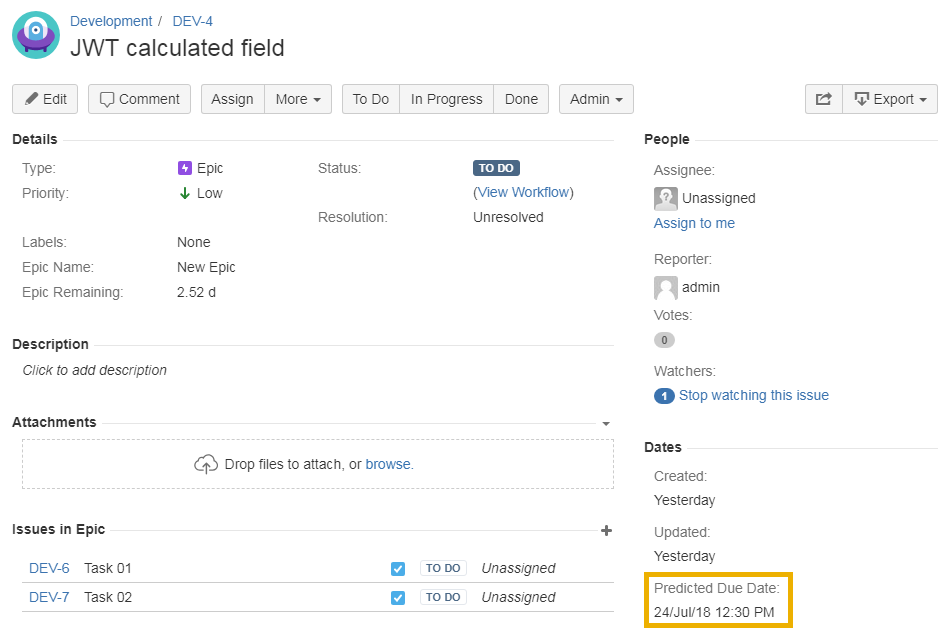
Use case
The prediction of the completion date of an epic is very useful for reporting and planning purposes.
This use case calculates the predicted completion date based on cumulated remaining estimates of all issues linked to each epic.
To calculate the remaining estimates, a second calculated field will be used, which is explained in this use case: Total remaining estimate in an epic (all linked issues)
🛠️ Configuration
Create a new Calculated Date-Time Field (by JWT) custom field and name it appropriately.
Providing a description will help you to identify what the custom field does, but this step is optional.
Parser expression
Add the following expression:
Date/Time expression for Calculated Date/Time field:
addTimeSkippingWeekends(%{system.currentDateTime}, {issue.cf10200}*{DAY}, LOCAL, {FRIDAY}, {SATURDAY})
{issue.cf10200} is the field code for the calculated field Epic Remaining. See this use case on how to calculate this value: Total remaining estimate in an epic (all linked issues)
Additionally to the JWT calculated number field this example uses the addTimeSkippingWeekends() function.
Display Format
Format type
Choose Date Time Picker
Add the field to the relevant view screens.
Remember: All calculated fields are read-only and cannot be manually updated on a create or edit screen.
Check the results
Once configured and added to an issue screen (e.g. an epic), the result will look like this: