
TL;DR → sumUp versions running on Connect will retire soon. Please upgrade older sumUp installations before 31 December 2026.
sumUp has fully moved to Forge, Atlassian’s current app platform, and the latest version is ready for your team.
As we complete this transition, we’ll retire the services supporting older sumUp versions at the end of 2026. If you’re still using one of those versions, please arrange an upgrade before 31 December 2026 to continue using sumUp without relying on the retiring services.
Your Jira administrator can check your version and review any available update. If you need a hand, our support team is happy to help.
Why are we making this change?
Atlassian is ending support for its Connect platform on January 31, 2027. Migrating to Forge keeps sumUp compatible with Jira and provides a secure, robust foundation for faster app development.
Our legacy hosting services for the Connect version will retire at the end of December because maintaining Connect poses security risks. Atlassian has announced retiring the old platform in favor of a more secure, higher-performing platform. We recommend completing your sumUp upgrade before 31 December 2026 rather than waiting for Atlassian’s January deadline. If your site still runs Connect or Connect on Forge versions of sumUp, features that rely on these services will stop when they shut down, which may prevent your team from using sumUp.
You can read more in Atlassian’s official announcement.
What do Connect and Forge mean?
Connect and Forge describe the app framework behind sumUp. They are the app platform built by Atlassian that marketplace partners like us use to build app for Jira and Confluence. sumUp relied on Connect in the past while we have now fully migrated to Forge. They are not different sumUp subscription plans.
During our move to Forge, sumUp has gone through three stages:
|
Platform |
What it means |
|---|---|
|
Connect |
The original version of sumUp, which uses Connect and our legacy hosting services. An upgrade is needed before those services retire. |
|
Connect on Forge |
A transitional version. Some parts have moved to Forge, while others still use Connect and our legacy services. Another upgrade completes the move. |
|
Fully Forge |
The transition is complete. This version does not depend on the legacy Connect backend being retired. |
You do not need to understand the technical details to upgrade. The version guide below will help you identify where your installation stands. If you’ve upgraded before, you may already be on fully Forge, or you may have completed the intermediate step. The version guide below will help you check.
Which sumUp version am I running?
Your administrator can find your installed version in Connected apps or Manage apps, under sumUp.
|
Your installed version |
What it means |
Next step |
|---|---|---|
|
Ends in |
You’re running Pure Connect. |
Upgrade to the latest release before 31 December 2026. |
|
v4.4.0 up to, but not including, v7.0.0 |
You’re likely running Connect on Forge. |
Upgrade to the latest release before 31 December 2026 to complete the transition. |
|
v7.0.0 or later |
You’re running fully Forge. |
No Connect migration is needed. Make sure you run the latest version to enjoy our newest features, fixes, and improvements. |
Not sure which version you have? Contact sumUp support and we’ll help you check.
What does the “Legacy” label mean?
You may see a Legacy label beside sumUp in Atlassian’s app management screen. This indicates that the installation still uses Connect. An Update label indicates that an update is available.
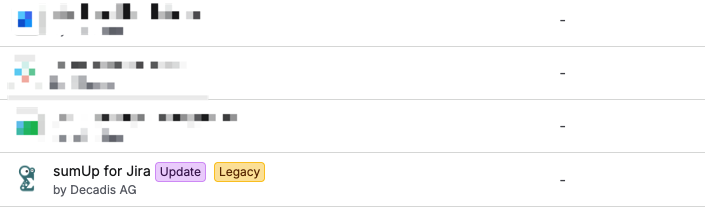
The Legacy label does not mean your Jira data has been lost. It is a prompt to review the app’s upgrade path. See Atlassian’s explanation of the Connected Apps notices.
How do I upgrade?
If you are a Jira administrator:
-
Open Connected apps or Manage apps for your Jira site.
-
Find sumUp and open its details.
-
Select the available update option and review any requested permissions.
-
Complete the update, then open your usual sumUp dashboards and reports to check them.
If you are running an older version but don’t see an update option, contact us for assistance.
If you are not an administrator: share this page with the person who manages apps on your Jira site.
Please use the update process rather than uninstalling and reinstalling sumUp.
What happens to my data?
Your Jira work items stay in Jira. You do not need to export, recreate, or move your projects, issues, or worklogs to upgrade sumUp.
Your sumUp report configurations—such as selected filters, columns, and grouping options—are separate from the Jira data displayed in your reports. After updating, check your important reports and personal display preferences.
If a report looks different or a setting appears missing, contact us before deleting or recreating the gadget. We’ll help investigate.
We already upgraded once. Why is another update needed?
An earlier update may have moved your installation to Connect on Forge. That was an intermediate step: parts of the app might still use Connect.
You may have upgraded to a Forge version but not to the latest release.
Updating to the latest sumUp release completes the transition. If you're already fully on Forge, Connect retirement needs no additional migration, but staying current gives you access to our latest improvements.
What if I’m still on an older version at the end of December?
Once the legacy services are retired, parts of older sumUp versions that depend on them will no longer work. This could affect loading reports, opening configuration screens, or using the app.
Your installation will not automatically move to fully Forge because the services have been retired. Completing the upgrade beforehand is the best way to keep your team’s reports available.
If your organisation needs time to approve updates, we recommend starting the process early. Please contact us if you need help planning the transition.
Need help?
Reach out to us via our support portal. To help us assist you, include:
-
Your installed sumUp version, if available
-
A screenshot of any update message or warning
We’ll review your version and advise the next step.